Breaking Down the Walled Garden: The Future of Migration to Android Phones
Introduction: The crumbling barriers of digital ecosystems
For over a decade, the smartphone market has been defined by a rigid duopoly. On one side, the curated, walled garden of iOS; on the other, the open, diverse landscape of Android Phones. For millions of users, the decision to choose one platform over the other hasn’t always been about hardware preference or software features. Instead, it has been driven by a pervasive fear: the fear of data loss. The prospect of leaving behind years of text messages, carefully curated photo libraries, and intricate app data has acted as a powerful anchor, keeping users locked into ecosystems they might otherwise wish to leave.
However, the technological landscape is shifting rapidly. As we move deeper into a new era of mobile computing, the friction that once defined cross-platform migration is being systematically dismantled. Recent developments in the software underlying the world’s most popular mobile operating system suggest a major pivot toward interoperability. We are witnessing a concerted effort to make the transition between operating systems not just possible, but seamless.
This article explores the technical evolution of data migration, the implications of new “Canary” build features, and why the latest crop of Android Gadgets is becoming increasingly accessible to users previously locked in competitor ecosystems. We will delve into the protocols, the pitfalls, and the practical realities of switching devices in the modern age.
Section 1: The Evolution of Cross-Platform Migration
From Manual Entry to High-Speed Handshakes
To understand the significance of current Android News regarding data transfer, one must appreciate the history of the process. In the early days of smartphones, switching from an iPhone to an Android device (or vice versa) was a manual, often painful endeavor. Users had to export contacts to VCF files, manually drag and drop photos onto a computer, and accept that their SMS history was lost to the ether. It was a digital fresh start, whether the user wanted one or not.
Over time, Google introduced cloud-based solutions. Google Drive became the intermediary, allowing users to back up contacts, calendars, and photos on an iOS device and restore them upon signing into a new Android phone. While functional, this method was slow, reliant on internet upload speeds, and often failed to transfer on-device data like device settings or message history.
The “Switch to Android” Era
The introduction of the dedicated “Switch to Android” application marked a turning point. This allowed for a direct connection—initially via cable, and later via Wi-Fi—between devices. This local transfer method bypassed the cloud, significantly increasing speed and security. However, limitations remained. Due to the sandboxed nature of iOS, Android could only “see” and extract specific types of data that Apple allowed to be exported.
The Canary in the Coal Mine: Next-Gen Migration
Recent technical analyses of Android’s “Canary” releases—the experimental, bleeding-edge versions of the OS used by developers—reveal that Google is aggressively optimizing this pipeline. The goal is no longer just “data transfer”; it is “state restoration.” The objective is to have a user pick up a Samsung Galaxy S24 or a Google Pixel 9 and feel as though their digital life has been teleported, not just copied.
The latest code suggests new capabilities that utilize faster Wi-Fi Direct protocols and more intelligent data parsing. This means the operating system is laying the groundwork to handle complex data types that were previously impossible to move, potentially including more granular app data, eSIM profiles, and reorganized file hierarchies that match the user’s previous behavior.
Section 2: Technical Deep Dive: How Modern Migration Works
The Protocol Layer: Speed and Security
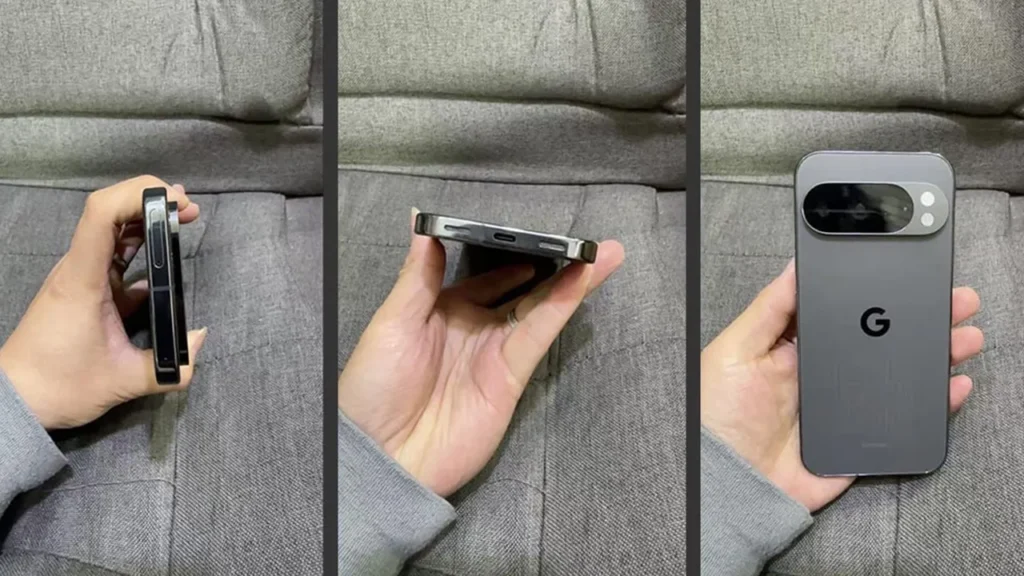
When you connect two modern smartphones to initiate a transfer, a complex negotiation occurs. If using a cable (Lightning/USB-C to USB-C), the devices establish a high-bandwidth peer-to-peer connection. However, the future is wireless. The latest Android Phones are leveraging 5GHz and 6GHz Wi-Fi bands to create a temporary, encrypted local network between the old and new devices.
This “Wi-Fi Direct” approach allows for transfer speeds that far exceed typical internet bandwidth. It is crucial for moving the massive photo and video libraries common on modern devices—often exceeding 100GB or 200GB. The new code spotted in development builds suggests optimizations to keep this connection stable even when transferring thousands of small files, a scenario that typically causes transfer protocols to throttle or hang.
The Metadata Challenge
Transferring a file is easy; transferring the context of that file is hard. One of the biggest technical hurdles has been metadata preservation. When a photo is moved from iOS to Android, it risks losing its “creation date,” causing a timeline of ten years to appear as if it all happened today. Modern migration tools utilize advanced parsing to read the EXIF data and file attributes, ensuring that the gallery on the new Android Gadget is chronologically identical to the old one.
The WhatsApp and Messaging Hurdle
Perhaps the most significant breakthrough in recent years, which is being further refined in current updates, is the handling of encrypted messaging databases. For years, WhatsApp history was stuck on the OS where it was created due to differences in database encryption and cloud storage (iCloud vs. Google Drive).
Through collaboration between OS developers and app creators, new migration tools can now securely decrypt, package, and re-encrypt this data during the transfer setup. This requires a “handshake” where the user authenticates on both devices simultaneously. The latest Android developments aim to streamline this further, potentially integrating third-party chat migration directly into the initial device setup wizard (OOBE – Out of Box Experience) rather than requiring users to open specific apps later.
eSIM and Credential Transfer
A major focus of the latest Android News cycles is the handling of eSIMs. As physical SIM cards vanish, the ability to transfer a cellular plan from an iPhone to an Android phone without scanning a carrier QR code is vital. The new migration frameworks are incorporating standards that allow the secure transfer of eSIM profiles, provided the carrier supports the protocol. This removes one of the last physical friction points in the switching process.
Section 3: Implications for the Mobile Market
Hardware Innovation as a Pull Factor
Why is Google investing so heavily in migration tools now? The answer lies in the hardware divergence. For years, smartphones were rectangular slabs of glass. Today, Android Phones offer form factors that simply do not exist in the competitor’s lineup. Foldables like the OnePlus Open, the Google Pixel Fold, and the Samsung Galaxy Z Flip series offer distinct functional advantages—multitasking, pocketability, and tablet-like media consumption.
By lowering the barrier to entry, Android manufacturers can leverage these unique form factors to attract power users who are bored with the iterative updates of the competition. If a user knows they can transfer their data seamlessly, the risk of trying a foldable device drops significantly.
The Role of RCS and Interoperability
![AI chatbot user interface - 7 Best Chatbot UI Design Examples for Website [+ Templates]](https://android-digest.com/wp-content/uploads/2025/12/inline_fc4f9a29.webp)
The timing of these improved migration tools coincides with the broader industry adoption of RCS (Rich Communication Services). With Apple finally adopting RCS, the “blue bubble vs. green bubble” stigma is diminishing. High-quality media sharing, typing indicators, and read receipts now work cross-platform.
This creates a synergy with the new migration tools. If the social penalty of leaving iMessage is removed (via RCS) and the technical penalty of data loss is removed (via improved migration tools), the market becomes truly fluid. Users are free to choose Android Gadgets based on merit, battery life, camera quality, and AI features rather than ecosystem lock-in.
AI and the “Smart” Switch
Artificial Intelligence is playing a growing role in the switching process. We are moving toward a scenario where the migration tool doesn’t just copy apps, but finds equivalents. If a user had a specific iOS-exclusive calendar app, the Android migration tool could theoretically suggest the best-rated Android equivalent and offer to download it during setup. This “intelligent mapping” of app ecosystems is the next frontier in reducing the cognitive load of switching operating systems.
Section 4: Best Practices and Recommendations
Preparing for the Switch: A Checklist
Despite the advancements in automated tools, a smooth transition to Android Phones still requires preparation. Here is a technical checklist for users planning to make the leap, based on the current capabilities of migration software:
- Deregister iMessage: This remains critical. If not done, SMS messages from other iPhone users may get lost in a server limbo. This must be done before wiping the old device.
- Clean Up Storage: Migration is faster if you aren’t transferring digital junk. Delete unused apps and old screenshots before initiating the transfer.
- Update Both Devices: Ensure the iPhone is on the latest iOS version and the new Android phone has run all available updates out of the box. The migration protocols are often updated in monthly security patches.
- Check Password Managers: If you use iCloud Keychain, export your passwords to a cross-platform manager (like Google Password Manager, Bitwarden, or 1Password) before switching.
- Local Backup: Always perform a local backup of WhatsApp and critical photos to a computer, just as a failsafe.
Pros and Cons of Switching in 2024/2025
![AI chatbot user interface - 7 Best Chatbot UI Design Examples for Website [+ Templates]](https://android-digest.com/wp-content/uploads/2025/12/unique_1347_0.jpg)
Pros:
- Customization: Android’s “Material You” design language allows for deep personalization that iOS cannot match.
- File Management: Real file systems allow for easier management of documents and downloads, treating the phone more like a computer.
- Hardware Variety: Access to foldables, stylus-equipped phones, and devices with headphone jacks or expandable storage (in some mid-range models).
Cons:
- App Quality Variance: While major apps are identical, some niche indie apps are still “iOS first” or better optimized for iPhone.
- Resale Value: generally, iPhones hold value longer than most Android devices, though Samsung and Pixel are closing this gap with 7-year update promises.
- Subscription Management: You will need to cancel iOS-based subscriptions and resubscribe via the Play Store, which can be administratively tedious.
Real-World Scenario: The Content Creator
Consider a content creator switching from an iPhone 13 Pro to a Samsung Galaxy S24 Ultra. Under the old migration protocols, they would lose their custom ringtones, their organized photo albums would be flattened into a single “camera roll,” and their video editing projects would be lost.
With the latest migration improvements found in modern Android News cycles, this creator can connect via cable. The transfer will not only move the raw video files but is increasingly capable of maintaining folder structures. Furthermore, the speed of the transfer via USB 3.2 standards means 500GB of 4K footage can be moved in a reasonable timeframe, making the “Pro” switch viable for professionals for the first time.
Conclusion
The “walled garden” strategy has been a lucrative business model for tech giants, but it is ultimately hostile to consumer choice. The latest developments in the Android ecosystem, specifically the under-the-hood improvements to data migration discovered in recent software builds, signal a shift toward a more open mobile future.
By systematically removing the pain points of switching—transferring eSIMs, decrypting message databases, and speeding up Wi-Fi transfers—Google is betting that when the walls come down, the quality of Android Phones will speak for itself. Whether it is the allure of AI integration, the novelty of foldable screens, or simply the desire for a file system that makes sense, users are gaining the freedom to move. The technology is no longer a barrier; it is a bridge. As these tools move from “Canary” testing to public release, the question for consumers changes from “Can I switch without losing my data?” to “Why haven’t I switched yet?”