The Modern Era of Android Phones: Hardware Innovation, Ecosystem Maturity, and the Migration Shift
Introduction
The landscape of mobile computing has undergone a seismic shift over the last decade. While the early days of the smartphone wars were defined by basic feature sets and app availability, the current era is defined by ecosystem maturity, hardware innovation, and the fluidity of user data. Android Phones have evolved from being merely the “alternative” choice to becoming the driving force behind many of the industry’s most significant technological leaps, including foldable displays, periscope zoom photography, and on-device artificial intelligence.
For years, a concept known as the “walled garden” kept users locked into specific operating systems, making the prospect of switching platforms daunting. However, recent developments in software engineering and regulatory pressure have begun to dismantle these barriers. We are witnessing a pivotal moment in Android News where the friction of migration is being systematically reduced through advanced transfer protocols and cloud synchronization tools. This article aims to provide a comprehensive technical analysis of the current state of the Android ecosystem, exploring why the hardware is more compelling than ever, how the software has matured to rival any competitor, and the technical realities of migrating to this open platform. Whether you are a long-time enthusiast or a curious switcher, understanding the underlying technology of modern Android Gadgets is essential for making informed purchasing decisions.
The Hardware Renaissance: Beyond the Rectangular Slab
When analyzing the current generation of Android devices, one must look beyond simple processor speeds and RAM counts. The true innovation lies in form factor diversification and the integration of specialized silicon.
Foldables and Flexible OLED Technology
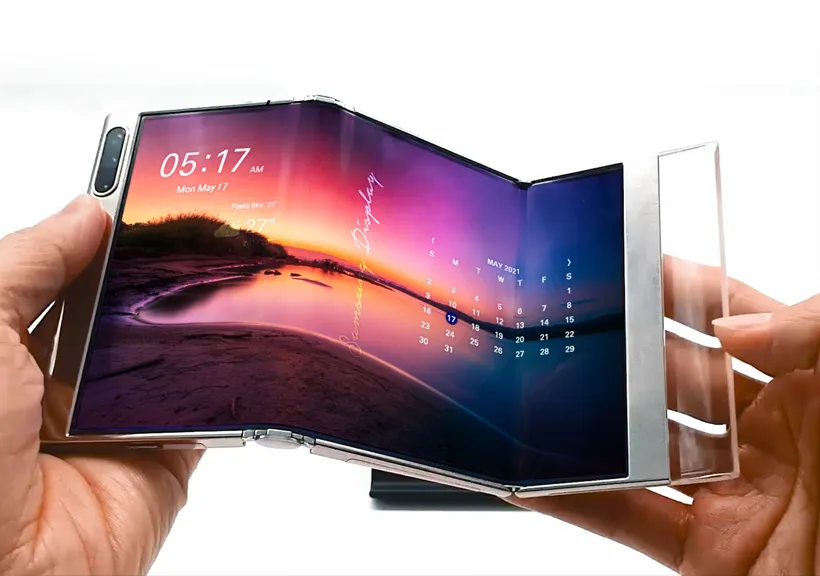
Perhaps the most distinct advantage Android holds over its competitors is the maturity of foldable technology. This is not merely a gimmick but a fundamental shift in how screen real estate is utilized. Devices like the Samsung Galaxy Z Fold series or the Google Pixel Fold utilize Ultra-Thin Glass (UTG) composites and complex hinge mechanisms that allow a device to transform from a phone into a tablet.
Technically, this requires a complete rethinking of the internal architecture. Batteries must be split into two cells to balance weight and accommodate the hinge. The operating system must support “continuity,” where an app seamlessly transitions from a cover screen to an expanded internal display without killing the activity process. For power users, this enables multitasking workflows previously impossible on mobile, such as running a video conference on one half of the screen while taking notes on the other.
Computational Photography and Sensor Physics
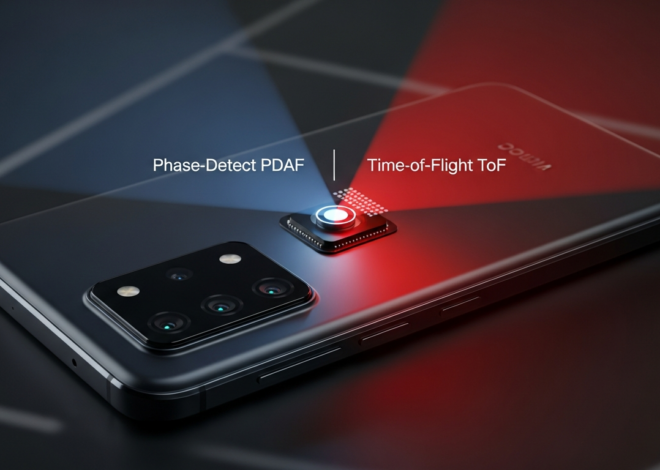
Android manufacturers have been aggressive in adopting larger sensor sizes, with several flagships now sporting 1-inch type sensors. Physically, a larger sensor captures more light, providing natural bokeh (background blur) and superior low-light performance without relying solely on software processing. However, the hardware is only half the story.
The integration of Neural Processing Units (NPUs) directly into chipsets—such as the Tensor core in Google’s silicon or the Hexagon processor in Snapdragon chips—has revolutionized image signal processing (ISP). Modern Android Phones perform semantic segmentation in real-time, identifying the sky, skin tones, and foliage, and processing them individually before the final image is saved. This allows for features like “Magic Eraser” or “Best Take,” which use generative AI to reconstruct pixel data, filling in gaps where objects are removed or altering facial expressions based on a burst of photos.
Display Technology: LTPO and Variable Refresh Rates
High refresh rate displays (120Hz or 144Hz) have become standard on premium Android devices, but the technical differentiator is LTPO (Low-Temperature Polycrystalline Oxide) backplane technology. This allows the display controller to dynamically adjust the refresh rate from 1Hz to 120Hz based on content. If the user is reading a static eBook, the screen drops to 1Hz to save power. If they are scrolling or gaming, it ramps up to 120Hz for fluidity. This granular control over power consumption is critical for managing battery life on devices with massive, high-resolution screens.
Software Maturity: The Evolution of the Android Ecosystem
The narrative that Android is “fragmented” or “unpolished” is largely a relic of the past. Modern Android versions (14, 15, and beyond) focus heavily on cohesion, privacy, and interoperability.
Server rack GPU – Graphics processing unit 19-inch rack Computer Servers Nvidia …
Interoperability and the “Better Together” Framework
One of the most significant areas of Android News is the development of cross-device continuity. Google and its partners have built a robust framework that mimics and often exceeds the continuity features found in closed ecosystems. Technologies like “Quick Share” (formerly Nearby Share) utilize a combination of Bluetooth, WebRTC, and peer-to-peer Wi-Fi Direct to transfer files between Android phones, tablets, Chromebooks, and even Windows PCs at high speeds.
Furthermore, the “Fast Pair” protocol utilizes Low Energy (LE) Bluetooth advertising packets to instantly detect and pair accessories like headphones or smartwatches when the case is opened. This eliminates the tedious process of digging through Bluetooth settings. This ecosystem approach extends to Android Gadgets like smart home hubs, where the phone acts as a localized controller, utilizing the Matter protocol to communicate with IoT devices regardless of the manufacturer.
The Rise of RCS (Rich Communication Services)
For years, the “green bubble” stigma was a technical hurdle involving the archaic SMS/MMS protocol. Android has spearheaded the adoption of RCS, an IP-based messaging protocol that replaces SMS. RCS supports read receipts, typing indicators, high-resolution media sharing, and group chat management. It functions similarly to proprietary instant messengers but is carrier-agnostic and built into the default messaging app.
The significance of RCS cannot be overstated for switchers. It bridges the communication gap between platforms. With end-to-end encryption now standard in Google Messages via RCS, security is no longer a compromise when communicating outside the ecosystem. This technical evolution is a key factor in making the switch to Android viable for users deeply embedded in group chats.
Material You and Dynamic Theming
From a UI/UX perspective, the “Material You” design language represents a sophisticated approach to personalization. The OS extracts color data from the user’s wallpaper and generates a complementary tonal palette. This palette is then applied system-wide—to icons, widgets, notification shades, and even third-party apps. This level of aesthetic cohesion is generated algorithmically, ensuring that every Android phone feels distinct to its user while maintaining accessibility standards regarding contrast and legibility.
The Technicalities of Migration: Breaking the Lock-In
The most critical aspect of the modern mobile landscape is the ease of migration. Historically, moving from one OS to another meant losing data. Today, sophisticated “Switch to Android” tools have automated this process, but understanding how they work is important for a successful transition.
Wired vs. Wireless Data Transfer Protocols
Modern migration tools utilize a direct cable connection (Lightning/USB-C to USB-C) for the most reliable transfer. When two devices are connected, the receiving Android device acts as the host, mounting the source device effectively as external storage. This allows for high-throughput transfer of heavy data like 4K video libraries and high-resolution photo archives.
The software layer scans the source database for contacts, calendars, and message history. A common challenge in the past was the “iMessage black hole,” where texts would get lost. Modern migration workflows now prompt users to deregister proprietary messaging services during the setup, ensuring that the phone number is correctly routed via carrier SMS/RCS protocols immediately. Furthermore, these tools now match existing apps on the source device with their Play Store equivalents, automatically queuing downloads for the new device.
Cloud Synchronization and Middleware
For data that resides in the cloud, Android leverages middleware solutions. For example, Google Photos can serve as a bridge. By backing up photos on the old device to the cloud, they become instantly available on the new Android phone without physically transferring files, saving onboard storage space. Similarly, cross-platform password managers and browser syncing (Chrome, Firefox) ensure that credentials and bookmarks are preserved.
However, users must be aware of DRM (Digital Rights Management) limitations. Purchased media on proprietary storefronts often cannot be transferred due to licensing restrictions. This is a legal hurdle rather than a technical one, but it remains a consideration for users with large libraries of purchased movies or TV shows on a competitor’s platform.
Server rack GPU – Amd 7443p 4u Gpu Rack Server With 128gb Ddr4 Memory & 5 Gpu Support
For the Power User: Customization, Sideloading, and Control
While ease of use has improved, the core philosophy of Android remains centered on user agency. This section explores the features that make Android Phones the preferred choice for technical professionals and enthusiasts.
The File System Advantage
Unlike restrictive operating systems that sandbox every application, Android exposes a user-accessible file system. This allows users to plug a USB-C drive directly into their phone and manage files using a standard file explorer, just like on a desktop computer. For creative professionals, this means you can offload RAW photos from a DSLR directly to your phone for editing in Lightroom Mobile, or transfer documents without relying on cloud intermediaries.
Sideloading and Open Source Repositories
Android allows the installation of applications from sources other than the official Play Store, a process known as “sideloading.” While this requires a security acknowledgement from the user, it opens the door to open-source repositories like F-Droid. Here, users can find software that prioritizes privacy, lacks trackers, or offers functionality that might violate the strict policies of commercial app stores (such as network-wide ad blockers or YouTube downloaders).
Automation and Launchers
The ability to replace the default “Launcher” (the home screen interface) allows for radical interface changes. Users can opt for minimalist text-based launchers or highly complex setups with custom gestures. Furthermore, automation tools like Tasker allow for deep system-level scripting. A user can program their phone to automatically turn on Wi-Fi and launch a specific music playlist when it detects the GPS coordinates of their home, or toggle battery saver mode when the screen is off during specific hours.
Server rack GPU – AMD Milan 73F3 4U GPU Rack Server for Sale – Gooxi ASR4110G-D10R-G2
Strategic Considerations: Pros, Cons, and Long-Term Viability
Before committing to the ecosystem, it is vital to weigh the strategic advantages against potential drawbacks.
Pros: Why Switch?
- Hardware Variety: Whether you want a stylus (S Pen), a folding screen, a gaming phone with shoulder triggers, or a ruggedized device, Android has a hardware SKU for that specific need.
- Price Flexibility: Excellent Android Gadgets exist at every price point, from $200 budget champions to $1,800 ultra-premium foldables.
- USB-C Universality: While competitors are just catching up, Android has used USB-C for years, ensuring compatibility with a vast ecosystem of docks, chargers, and peripherals.
- Notification Management: Android’s notification channels offer granular control, allowing users to block marketing pings from an app while keeping urgent message notifications active.
Cons: The Considerations
- Resale Value: Generally, Android devices depreciate faster than their primary competitor’s devices, though this is changing with longer support promises.
- App Optimization: Developers sometimes prioritize other platforms first, meaning new apps or features might arrive on Android slightly later, or with less optimization for specific hardware configurations (like camera integration in social media apps).
- Privacy Configuration: While Android is secure, it often requires more user configuration to achieve the same level of privacy out-of-the-box compared to more locked-down alternatives.
The Shift in Support Lifecycles
A major development in recent Android News is the extension of software support. Manufacturers like Google and Samsung have committed to 7 years of OS and security updates for their flagship devices. This effectively neutralizes the old argument that Android phones become obsolete after two years. This shift not only improves security but also increases the longevity and secondary market value of the hardware.
Conclusion
The decision to choose or switch to an Android phone is no longer about compromising on quality or ease of use. The ecosystem has matured into a sophisticated, interconnected environment that rivals any other in the industry. With the advent of seamless transfer tools, the friction of migration has been reduced to a minor inconvenience rather than a roadblock.
From the cutting-edge hardware of foldable displays and 1-inch camera sensors to the software intelligence of AI-driven image processing and universal translation, Android Phones offer a compelling vision of the future of mobile computing. For the user who values choice, customization, and the ability to control their digital environment, the Android platform stands as the superior technical choice. As cross-platform barriers continue to crumble, the focus shifts purely to the technology—and in that arena, Android is innovating at a breakneck pace.