

The Great Wall Crumbles: The Future of Interoperability Between iOS and Android Ecosystems
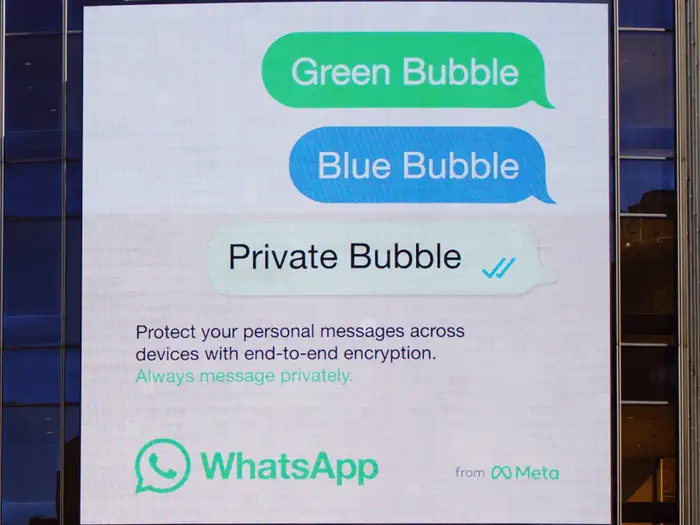
For over a decade, the mobile technology landscape has been defined by a binary choice: the walled garden of Apple or the open ecosystem of Google. This division created distinct user bases, social stigmas regarding “green bubbles,” and significant friction for anyone attempting to switch sides. However, the latest waves of Android News suggest a seismic shift is underway. Driven by regulatory pressures like the European Union’s Digital Markets Act (DMA) and evolving consumer demands, we are witnessing the dawn of a new era where cross-platform interoperability is not just a dream, but a developing reality.
Recent developments in beta software and operating system updates indicate that the barriers preventing seamless data transfer and notification synchronization between iOS and Android Phones are finally being dismantled. This article delves deep into the technical and practical implications of these changes. We will explore how new protocols are making it easier than ever to migrate data, the technical architecture behind cross-platform notification forwarding, and what this means for the future of mobile computing. Whether you are a die-hard Android enthusiast or an iOS user curious about the other side, understanding these shifts is crucial for navigating the future of mobile technology.
Section 1: The Evolution of Ecosystem Migration
Historically, moving from one operating system to another was a digital nightmare. Users risked losing years of chat history, metadata, and app data. However, the narrative is changing rapidly as tech giants prioritize user agency—albeit often under legal duress.
From Friction to Fluidity: The New Transfer Protocols
In the past, switching to Android meant relying on third-party software or clunky cloud backups that often failed to restore data correctly. Today, native solutions are leveraging direct cable connections (Lightning/USB-C to USB-C) and high-speed Wi-Fi Direct protocols to facilitate massive data transfers.
The modern migration process involves a handshake between the two operating systems that goes beyond simple file copying. When a user initiates a transfer to modern Android Phones, the system now performs a deep scan of the source device. This includes:
- Application Matching: The system identifies iOS apps and automatically queues their Android equivalents for download from the Play Store.
- Granular Data Parsing: Instead of just moving photos, the new protocols preserve EXIF data, location tags, and album structures.
- Secure Credential Handover: Advanced APIs allow for the secure tokenization of certain login credentials, reducing the need to log back into every single app manually.
The WhatsApp and Messaging Breakthrough
One of the most significant hurdles for years was proprietary messaging databases. WhatsApp, for instance, stores data differently on iOS (iCloud) compared to Android (Google Drive). Recent updates have standardized the local database export capability.
Case Study: The Professional Switcher
Consider “Marcus,” a graphic designer moving from an iPhone 14 Pro to a Samsung Galaxy S24 Ultra. In previous years, Marcus would lose three years of client chats on WhatsApp. With the latest transfer tools integrated into Android, the migration tool creates a local, encrypted tunnel between devices. It transcodes the message database in real-time, preserving timestamps, media, and voice notes. This level of fidelity was technically impossible without rooting or jailbreaking devices just five years ago.
The Role of Cable-Free Transfers
While cable transfers remain the fastest method for hundreds of gigabytes of data, wireless transfer speeds have improved drastically thanks to Wi-Fi 6 and 6E standards. The handshake process now utilizes a temporary, high-bandwidth peer-to-peer Wi-Fi network, allowing for transfer speeds that rival wired connections, ensuring that setting up new Android Gadgets is a matter of minutes, not hours.
Section 2: Notification Forwarding and Real-Time Sync
Perhaps the most exciting development in recent Android News is the concept of notification forwarding and cross-device mirroring. This technology bridges the gap for users who carry multiple devices—such as an iPad for work and an Android phone for personal use—or for those transitioning between ecosystems.
The Architecture of Cross-Platform Notifications
Notification forwarding is technically complex because it requires a system-level listener service to capture an incoming alert, encrypt it, and transmit it to a foreign operating system. The latest beta implementations suggest a move toward a standardized, secure protocol likely based on an extension of Bluetooth Low Energy (BLE) profiles and WebSockets.
Here is how the architecture functions:
- The Listener (Source Device): The iOS device utilizes a background process that listens for push notifications. When a notification arrives (e.g., an iMessage or Calendar alert), the system captures the payload.
- Encryption and Packaging: To maintain privacy, the payload is encrypted using a shared key established during the initial pairing process with the Android device. This ensures that the content of the notification cannot be intercepted over the air.
- Transmission: The data is sent via BLE (for proximity) or a cloud relay (for remote access) to the Android receiver.
- The Receiver (Target Device): The Android phone decrypts the packet and injects it into its own notification shade, often with a distinct icon indicating it originated from a linked device.
Actionable vs. Passive Notifications
The “Holy Grail” of this technology is actionability. Passive notifications simply tell you a message arrived. Actionable notifications allow you to reply from the Android device and have that reply route back through the iPhone. This requires deep API access known as “Remote Input.”
We are seeing early iterations of this where Android Gadgets, specifically smartwatches and tablets, can act as remote terminals. This mirrors the functionality currently seen in Microsoft’s “Link to Windows,” but applied directly between mobile OS competitors. If fully realized, this allows an Android user to leave their corporate iPhone in a bag and manage all communications solely through their personal Android interface.
Implications for Wearables
This technology has massive implications for the wearable market. Currently, an Apple Watch is a paperweight without an iPhone, and a Galaxy Watch loses features on iOS. Notification forwarding protocols could eventually allow Android Gadgets (like the Pixel Watch) to display and interact with notifications from an iPad or secondary iOS device, breaking the hardware lock-in that currently defines the smartwatch industry.
Section 3: Strategic Implications and Market Insights
Why is this happening now? The convergence of technical capability and regulatory arm-twisting is creating a perfect storm for interoperability.
The Regulatory Hammer: DMA and Beyond
The European Union’s Digital Markets Act (DMA) explicitly targets “gatekeepers”—large tech companies that control core platform services. One of the mandates involves interoperability. While much of the focus has been on third-party app stores and payment systems, the requirement for “effective interoperability” extends to data portability and communication services.
Apple’s move toward adoption of RCS (Rich Communication Services) was the first domino. The potential introduction of easier transfer tools and notification bridging is a proactive (or perhaps reactive) measure to satisfy regulators that the ecosystem is not a monopoly. For Android News outlets, this is a continuous stream of victories for consumer choice.
The “Trojan Horse” Strategy
From a strategic standpoint, making it easier to switch to Android is obviously beneficial for Google and partners like Samsung and Xiaomi. However, for Apple, offering notification forwarding to Android devices might seem counterintuitive. Yet, it can be viewed as a retention strategy for multi-device households.
If a user loves their iPad but prefers an Android phone, allowing those devices to talk to each other prevents the user from abandoning the iPad entirely. It acknowledges the reality of a heterogeneous tech world. Conversely, Google has been aggressive with “Switch to Android” apps on iOS, constantly refining them to ensure that the fear of data loss is no longer a valid reason to stay with Apple.
Impact on App Developers
For developers, this shift reduces the burden of building bespoke synchronization engines. If the OS layers handle the data handover and notification mirroring, developers can focus on feature parity. It also opens the door for “Companion Apps” that truly work across platforms. Imagine a health app that aggregates data from an Apple Watch and a Pixel Ring into a single dashboard on an Android tablet, synchronized via these new OS-level bridges.
Section 4: Practical Guide and Best Practices
For users looking to take advantage of these emerging capabilities, or those planning a switch to Android Phones in light of these improvements, there are several best practices to ensure a smooth experience.
Pre-Migration Checklist
Even with improved tools, preparation is key. Before initiating a transfer from iOS to Android:
- Deregister iMessage: This remains a critical step. Failure to deregister can result in “ghost texts” where SMS messages from iPhone users fail to arrive on your new Android device.
- Consolidate Cloud Accounts: Ensure your contacts are synced to a Google Account rather than just stored locally on the iPhone or in iCloud. While transfer tools handle this, a cloud backup is a safety net.
- Check 2FA Apps: Authenticator apps (like Google Authenticator or Authy) do not always transfer their tokens automatically due to security constraints. Ensure you have backup codes or transfer the accounts manually before wiping the old device.
Optimizing Notification Forwarding
If you are utilizing beta features or third-party tools that mimic notification forwarding:
- Battery Optimization: Android is aggressive about killing background processes to save battery. You must go into Settings > Apps > Special App Access > Battery Optimization and exclude your bridging app to ensure real-time notification delivery.
- Privacy Permissions: Granting “Notification Access” is a high-level permission. Only use trusted, verified apps or native OS features for this. A malicious app with this permission can read your 2FA codes and private messages.
- Filter Noise: Mirroring every notification can be overwhelming. Set up filters to only forward essential apps (e.g., Slack, WhatsApp, Calendar) to avoid double-buzzing on both devices.
Pros and Cons of the New Ecosystem Fluidity
Pros:
- Freedom of Hardware Choice: You can choose the best phone for your needs (e.g., a foldable Android) without losing connection to your family’s ecosystem.
- Reduced E-Waste: Easier migration encourages the reuse of older devices as secondary terminals.
- Data Sovereignty: Users truly own their data if they can move it freely between platforms.
Cons:
- Security Surface Area: Bridging two secure ecosystems introduces potential vulnerabilities at the connection point.
- Feature Lag: Forwarded notifications may not support all the rich interactions (like “long press to preview”) native to the source OS.
- Privacy Concerns: Metadata stripped during transfer or sync might be used for ad targeting if not properly encrypted.
Conclusion
The days of the impenetrable walled garden are numbered. While the rivalry between iOS and Android will undoubtedly continue, the battlefield is shifting from “lock-in” to “quality of service.” The latest developments in Android News highlight a future where technology serves the user, not the other way around. With the advent of seamless data transfers, notification forwarding, and increased regulatory oversight, the friction that once held users hostage is dissolving.
For the consumer, this is an absolute win. It means that your choice of smartphone can be based on the camera quality, the screen technology, or the form factor—like the innovative foldables dominating the Android Gadgets market—rather than being tethered by the fear of losing your chat history. As we move forward, we can expect these bridges between ecosystems to become sturdier, faster, and more transparent, ultimately creating a more connected and flexible digital world.



