
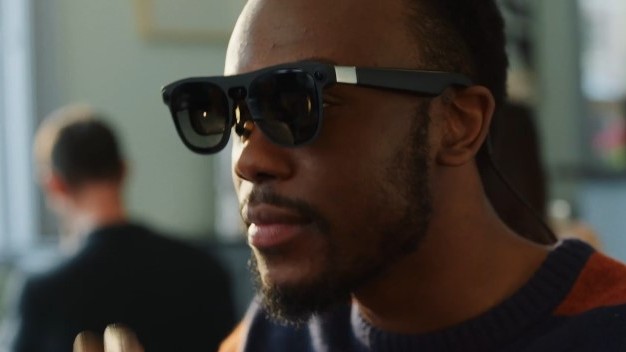
The Era of Android XR: Google’s Vision for Smart Glasses and Spatial Computing
Introduction
The landscape of mobile computing is on the verge of a seismic shift. For over a decade, the smartphone has been the undisputed center of our digital lives. However, the latest Android News suggests that the screen in your pocket is about to get a powerful extension—or perhaps, eventually, a replacement. We are entering the age of Extended Reality (XR), and Google is positioning Android to be the operating system that defines this new frontier.
Recent developments indicate a massive push toward Android XR, a dedicated platform designed to power the next generation of spatial computing devices, specifically smart glasses and mixed-reality headsets. This is not merely a virtual reality experiment; it is a calculated ecosystem play intended to unify the fragmented world of AR and VR under the familiar banner of the green robot. As tech giants race to overlay digital information onto the physical world, the implications for consumers, developers, and enterprise users are profound.
In this comprehensive analysis, we will explore the architecture of Android XR, how it integrates with existing Android Phones and Android Gadgets, and what this means for the future of human-computer interaction. We will look beyond the hype to understand the technical specifications, real-world use cases, and the inevitable challenges facing this ambitious leap forward.
Section 1: The Architecture of Android XR
Defining the Platform
Android XR is not simply a port of the mobile operating system tailored for a smaller screen. It is a fundamental reimagining of how Android handles input, display rendering, and multitasking in a three-dimensional space. Unlike traditional Android, which relies on a 2D coordinate system for touch inputs, Android XR is built upon a spatial framework. This allows applications to exist not just on a flat plane, but anchored to physical objects in the real world or floating in a virtual environment.
At its core, Android XR leverages the flexibility of the Linux kernel but introduces a new window management system capable of stereoscopic rendering. This ensures that digital objects maintain their position relative to the user’s head movement with sub-millisecond latency—a critical requirement to prevent motion sickness and ensure immersion.
The Strategic Triad: Google, Samsung, and Qualcomm
One of the most significant aspects of this Android News cycle is the collaboration driving it. Google is providing the software (Android XR), Qualcomm is supplying the chipset (Snapdragon XR2+ Gen 2 platforms), and Samsung is crafting the flagship hardware. This triad mirrors the early success of Android smartphones, where specialized roles created a robust ecosystem.
This partnership is designed to combat the vertical integration of competitors like Apple. By creating a standardized OS that various manufacturers can use, Google aims to flood the market with diverse Android Gadgets ranging from high-end enterprise headsets to lightweight, fashionable smart glasses.
OpenXR and Developer Accessibility
A critical technical pillar of Android XR is its support for OpenXR, the open standard for virtual and augmented reality. This is a game-changer for content availability. It means that developers who have built applications for other OpenXR-compliant platforms can port their software to Android XR with minimal friction. Furthermore, Google is enabling standard 2D Android applications to run natively within the XR environment. This immediately populates the app store with millions of existing titles, allowing users to scroll through social media or check emails on a massive virtual screen projected by their smart glasses.
Section 2: User Experience and The Role of AI
The Spatial User Interface
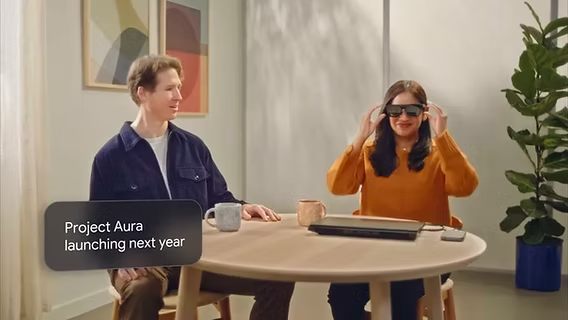
Moving from a touchscreen to smart glasses requires a complete overhaul of User Experience (UX) design. Android XR introduces a multimodal input system. While Android Phones rely on tapping glass, Android XR utilizes a combination of hand tracking, eye tracking, and voice commands.
Imagine sitting at a desk. With Android XR smart glasses, you are no longer limited by the physical monitors in front of you. You can spawn three virtual monitors, pin a music player to the wall, and have your calendar hovering over your coffee mug. The interface creates a “spatial dashboard” that persists even as you move around the room. The “Launcher” is no longer a grid of icons on a background; it is a floating dock that follows your gaze, ready to deploy applications into your physical space.
Gemini: The Brain Behind the Glasses
Hardware specifications are important, but Artificial Intelligence is the true killer app for smart glasses. Google is deeply integrating its Gemini AI models into the core of Android XR. This transforms the device from a passive display into an active assistant.
Because smart glasses have cameras and microphones, Gemini can see what you see and hear what you hear. This enables “multimodal” queries. For example:
- Visual Search: You can look at a broken part of a bicycle engine and ask, “How do I fix this?” The AI identifies the part and overlays a repair tutorial directly onto the object.
- Live Translation: During a conversation with someone speaking a different language, the glasses can provide real-time, subtitled translations floating near the speaker’s face.
- Contextual Awareness: If you are looking at a concert poster, you can simply say, “Buy tickets for this,” and the system understands the context without you needing to specify the band or date.
Integration with the Android Ecosystem
Continuity is key to the success of Android Gadgets. Android XR is designed to work seamlessly with your existing devices. A feature likely to be termed “Cross-Device Services” allows for instant handoffs. You might start reading an article on your phone during your commute, and the moment you put on your smart glasses, the article expands into a large virtual window.
Furthermore, the smartphone will likely serve as a compute puck or a controller for lighter versions of smart glasses. By offloading heavy processing to the phone, the glasses can remain slim, stylish, and battery-efficient, addressing one of the biggest hurdles in wearable tech.
Section 3: Implications for the Market and Industry
The Battle for the Face
The tech industry is currently engaged in a “battle for the face.” While the wrist (smartwatches) has been conquered, the eyes remain the holy grail of computing. The release of Android XR signals that Google is ready to challenge incumbents like Meta and Apple.
Unlike Apple’s strategy, which focuses on ultra-premium, high-cost hardware, the Android model has always been about accessibility and choice. We can expect a wave of Android News in the coming years announcing smart glasses from brands like Xiaomi, Oppo, and Sony, all running on the unified Android XR platform. This democratization drives down costs and accelerates innovation through competition.
Enterprise and Industrial Applications
![AI chatbot user interface - 7 Best Chatbot UI Design Examples for Website [+ Templates]](https://android-digest.com/wp-content/uploads/2025/12/inline_3741f964.jpg)
While consumer gaming and media consumption grab the headlines, the immediate value of Android XR lies in enterprise. The ability to overlay schematics, checklists, and thermal imaging data onto the real world is invaluable for industries like manufacturing, healthcare, and logistics.
Case Study: Field Service Technicians
Consider a technician repairing a wind turbine. Holding a tablet is dangerous and inefficient. With Android XR smart glasses, the technician has hands-free access to the maintenance manual. If they encounter an anomaly, they can initiate a video call where a remote expert sees exactly what the technician sees (via the glasses’ camera) and can draw circles or arrows in the technician’s field of view to guide them. This capability drastically reduces downtime and training costs.
The Developer Gold Rush
For software engineers, Android XR represents a new frontier. The transition from 2D to 3D design requires new skills, but the rewards are potentially massive. Developers who move early to adapt their apps for spatial environments will define the user habits of the next decade. Google provides tools like Android Studio with XR extensions and Jetpack Compose for XR, making it easier for traditional Android developers to transition their skills to spatial computing.
Section 4: Challenges, Considerations, and Best Practices
Hardware Constraints and Physics
Despite the software advancements, the laws of physics remain a barrier. Smart glasses must balance three competing factors: performance, battery life, and thermal management. If the device is too hot, it cannot be worn on the face. If the battery lasts only an hour, it is useless for daily wear.
Best Practices for Consumers:
- Expectations Management: Early generations of Android XR glasses will likely rely on tethering to Android Phones for battery and processing power.
- Fit and Comfort: Unlike a phone, comfort is subjective and critical. Trying devices in-person before purchasing will be essential.
![AI chatbot user interface - 7 Best Chatbot UI Design Examples for Website [+ Templates]](https://android-digest.com/wp-content/uploads/2025/12/inline_0c768f84-scaled.jpg)
Privacy and Social Acceptance
The reintroduction of cameras on glasses raises significant privacy concerns, reminiscent of the “Google Glass” backlash of the early 2010s. However, society has changed; we are now accustomed to being recorded by phones and security cameras. To mitigate this, Android XR includes hardware-level indicators (LED lights) that activate whenever the camera is recording.
From a social etiquette standpoint, users will need to learn when it is appropriate to wear the device. “Passthrough” technology allows eye contact by rendering the user’s eyes on an outer screen (in headsets) or using transparent optics (in glasses), but the social friction remains a hurdle.
Fragmentation Risks
One of the historical downsides of Android is fragmentation—different devices running different versions of the OS. In the XR space, fragmentation is more dangerous because hardware varies wildly (handheld controllers vs. hand tracking, transparent lenses vs. video passthrough). Google must enforce strict compatibility standards to ensure that an app downloaded from the Play Store works equally well on a Samsung headset as it does on another brand’s smart glasses.
Conclusion
The preview and eventual rollout of Android XR marks a pivotal moment in the history of personal computing. It represents the transition from looking at the internet to living inside it. By leveraging the vast ecosystem of Android Phones and the versatility of Android Gadgets, Google is building a bridge to the future that is accessible, open, and intelligent.
While challenges regarding battery life, privacy, and social acceptance remain, the utility of having AI-powered, context-aware information overlaying our vision is undeniable. As developers begin to populate this new spatial world and hardware manufacturers refine the form factors, the smart glasses revolution is no longer a question of “if,” but “when.” For technology enthusiasts following Android News, the next few years promise to be the most exciting since the launch of the original smartphone.



