

The Great Wall Falls: How Android and iOS Are Finally Unifying File Sharing
Introduction: The End of the Ecosystem Divide
For over a decade, the smartphone market has been defined by a stark, invisible wall separating two distinct worlds. On one side, you have the open, diverse ecosystem of Android Phones; on the other, the tightly controlled “walled garden” of iOS. While both platforms have matured into sophisticated operating systems, one pain point has remained a constant source of frustration for users globally: file sharing. The simple act of transferring a high-resolution photo or a large video file between an Android device and an iPhone has historically required clumsy workarounds, third-party apps, or cloud uploads that degrade quality.
However, the landscape of Android News is shifting dramatically. Driven by evolving regulatory frameworks in Europe and a push toward universal technological standards, the era of ecosystem isolation is coming to a close. The integration of Wi-Fi Aware technology—specifically the adoption of Neighbor Awareness Networking (NAN)—is bridging the gap between Google’s Quick Share and Apple’s AirDrop. This development, spearheaded by upcoming hardware like the Pixel 10, marks a monumental shift in how Android Gadgets interact with the wider tech world. It represents a small win for interoperability but a giant leap for user convenience, effectively ending the “green bubble” equivalent of file transfer.
Section 1: The Technology Behind the Bridge – Wi-Fi Aware and NAN
To understand the magnitude of this shift, one must look beyond the user interface and into the wireless protocols that make it possible. For years, AirDrop and Android’s various sharing iterations (from Android Beam to Nearby Share, and now Quick Share) operated on similar principles but different languages. They both utilized Bluetooth for discovery and handshake, followed by a direct Wi-Fi connection for data transfer. However, because the discovery protocols were proprietary, the devices simply refused to “see” each other.
Understanding Neighbor Awareness Networking (NAN)
The breakthrough comes in the form of Wi-Fi Aware, also known technically as Neighbor Awareness Networking (NAN). Unlike traditional Wi-Fi, which requires devices to connect to a central access point (like a router), Wi-Fi Aware allows devices to discover and communicate with one another directly, continuously, and energy-efficiently without joining a network. While Android has supported various forms of this for some time, the regulatory pressure from the EU’s Digital Markets Act (DMA) has compelled Apple to adopt this open standard for interoperability.
This standardization means that the “handshake”—the initial moment where a phone scans for nearby devices—is now happening on a shared frequency using a shared language. When a Pixel 10 user taps “Quick Share,” the device broadcasts a NAN signal. Because the iPhone is now mandated to listen for this standard Wi-Fi Aware signal, it can identify the Android device as a valid sender, bridging the two proprietary protocols.
From Bluetooth Handshakes to High-Speed Transfer
The process involves a sophisticated sequence of events that happens in milliseconds:
- Discovery: The devices use low-energy Wi-Fi Aware to find each other, bypassing the need for Bluetooth pairing.
- Authentication: Security certificates are exchanged to ensure the sender is not malicious and, if settings permit, is a known contact.
- Data Pathway: Once accepted, the devices establish a high-bandwidth point-to-point Wi-Fi Direct connection.
- Transfer: The file is sent at speeds capable of handling gigabytes of data in seconds, far surpassing Bluetooth speeds.
This unification of the discovery layer is the key. It transforms Android Gadgets from isolated islands into universal hubs capable of interacting with any modern mobile device, regardless of the logo on the back.
Section 2: The Hardware Catalyst – Pixel 10 and the Future of Android Phones
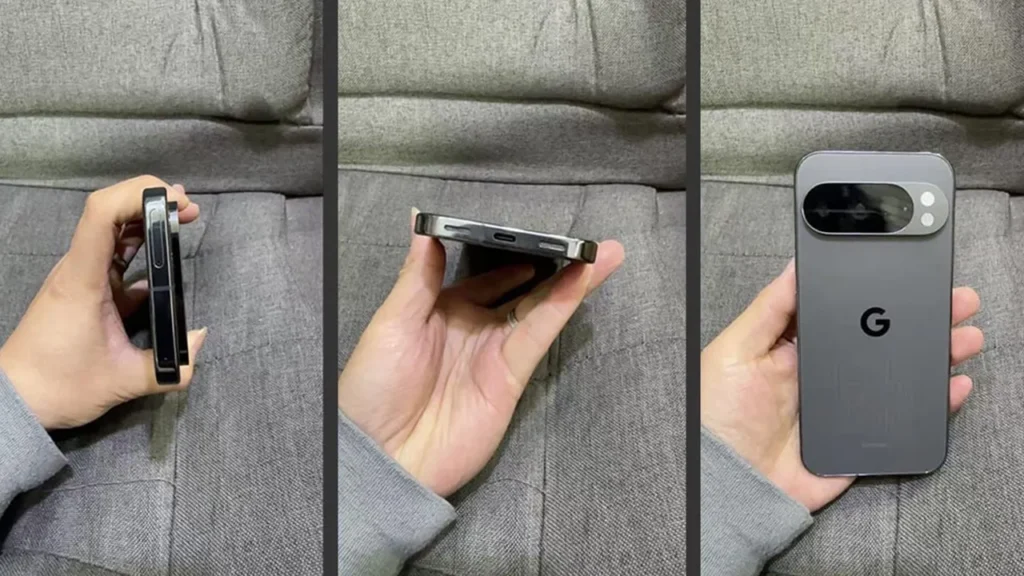
While software protocols are essential, hardware implementation is the vehicle that delivers these features to consumers. The upcoming Pixel 10 is positioned as the pioneer for this new age of interoperability. As is often the case with Android News, Google’s flagship devices serve as the reference design for the rest of the ecosystem.
Why Hardware Matters: The Chipset Requirement
Support for cross-platform sharing isn’t just a software update; it requires specific Wi-Fi chipsets capable of handling the new Wi-Fi Aware standards efficiently. The Pixel 10’s modem and connectivity stack have been optimized to handle the dual-duty of maintaining internet connectivity while simultaneously scanning for NAN signals from iOS devices. This ensures that the battery drain—a common concern with constant device scanning—is negligible.
For the broader market of Android Phones, this sets a new benchmark. Manufacturers like Samsung, OnePlus, and Xiaomi will likely follow suit, integrating similar Wi-Fi Aware capabilities into their logic boards to ensure they don’t fall behind Google’s first-party offering. We are likely to see a tiered rollout where flagship devices receive this capability first, followed by mid-range devices as the requisite Wi-Fi chips become cheaper and more ubiquitous.
Impact on the Broader Ecosystem of Android Gadgets
The implications extend far beyond smartphones. Consider the vast world of Android Gadgets, including tablets, smartwatches, and even automotive infotainment systems (Android Auto).
- Tablets: An Android tablet can now seamlessly receive project files from a colleague’s iPad, facilitating a mixed-OS workflow in creative industries.
- Smart Home Hubs: Smart displays running Android Things or similar variants could potentially serve as “drop zones” for family photos sent from any device in the house.
- Wearables: While bandwidth is lower, the discovery protocols could eventually allow for easier pairing or small data transfers between cross-platform wearables and phones.
Section 3: Real-World Scenarios and Workflow Implications
The technical unification of Quick Share and AirDrop changes the daily reality for millions of users. The friction of moving data between operating systems has long been a barrier to switching phones or using secondary devices. By removing this friction, the utility of Android Phones increases significantly in mixed environments.
Case Study: The Mixed-OS Household
Consider the “Smith” family. The parents use high-end Samsung devices, while the teenagers use iPhones. Previously, sharing vacation photos meant uploading them to Google Photos or sending compressed versions via WhatsApp or iMessage (which degrades to SMS/MMS for Android). With the new interoperability:
Scenario: The father takes a 4K video of a graduation ceremony on his Android phone. He taps Quick Share, sees his daughter’s iPhone appear in the “Nearby” list, and transfers the 2GB file in seconds without quality loss. This seamless interaction eliminates the “green bubble” stigma associated with media sharing.
Case Study: The Professional Environment
In professional settings, Bring Your Own Device (BYOD) policies often result in a mix of Android Gadgets and Apple products. Marketing teams, for example, often use iPads for illustration but may prefer the camera systems of the latest Pixel or Galaxy phones for capturing content.
Scenario: A social media manager captures raw footage on a Pixel 10. Previously, they would have to cable the phone to a laptop or wait for a cloud sync to get the footage onto an iPad for editing in DaVinci Resolve or LumaFusion. Now, the transfer is direct and instantaneous, streamlining the content creation pipeline and making Android devices more viable tools for creative professionals who rely on iPad apps for post-production.

The Death of “Workaround” Apps
This native integration spells the likely end for a category of third-party utility apps. Applications like Send Anywhere, SHAREit, or messy FTP server solutions were popular solely because they solved the interoperability problem. With the OS-level integration of Wi-Fi Aware, users no longer need to install ad-ridden third-party software to perform basic file maintenance. This cleans up the app drawer and improves overall device security.
Section 4: Privacy, Security, and Best Practices
With great connectivity comes great responsibility. Opening up Android Phones to receive files from the iOS ecosystem doubles the potential pool of senders, which introduces new security and privacy considerations. Google and Apple have different approaches to privacy, and merging their discovery protocols requires users to be vigilant.
Managing Visibility Settings
The most critical aspect of this new feature is visibility management. Users will generally have three options:
- Hidden: Your device does not broadcast its Wi-Fi Aware availability. This is the most secure setting and saves the most battery.
- Contacts Only: The device is visible only to people saved in your address book. This requires email/phone number hashing to verify identity across Google and iCloud accounts.
- Everyone (10 Minutes): The device is visible to anyone nearby. This is useful for quick transfers with strangers but should be used with caution.
Best Practice: Keep your device set to “Contacts Only” by default. The “Everyone” setting has historically led to “cyber-flashing” (the sending of unsolicited, inappropriate images) on the iOS side. Android users must now be aware that they are susceptible to this same annoyance if they leave their visibility wide open in public spaces.
Security Handshakes
Despite the interoperability, the encryption standards remain robust. The file transfer occurs over an encrypted Wi-Fi Direct channel. Even if a malicious actor were “sniffing” the Wi-Fi packets in a coffee shop, they would not be able to intercept the file being transferred between the Android and iOS device. However, users should always verify the “Device Name” of the sender before accepting a file to ensure they aren’t accepting malware from a spoofer.
Potential Pitfalls
While the technology is promising, early adoption often comes with bugs. Users might experience:
- Version Mismatches: Older iOS devices or Android phones without Wi-Fi Aware chips will not support this feature, leading to confusion about why it works with one friend but not another.
- Driver Conflicts: On the Android side, the fragmentation of hardware means that some manufacturers might implement the Wi-Fi Aware stack differently, potentially causing connection drops or slow speeds initially.
Conclusion
The forced adoption of Wi-Fi Aware by Apple, and the subsequent integration with Google’s Quick Share on devices like the Pixel 10, represents a watershed moment in mobile computing history. It is a rare instance where regulatory action has led directly to a tangible, technical improvement in the daily lives of consumers. For enthusiasts of Android News, this validates the platform’s long-standing commitment to open standards.
As this technology permeates the market, the walls between the two dominant mobile operating systems will become more porous. While they will continue to compete fiercely on features, cameras, and AI capabilities, the fundamental utility of moving data between them will no longer be a weapon used to lock users in. For owners of Android Gadgets, the world just got a little bigger, a little more connected, and significantly more convenient.



