Pixel 10 Pro Thermal Throttling Under Gemini Nano Workloads
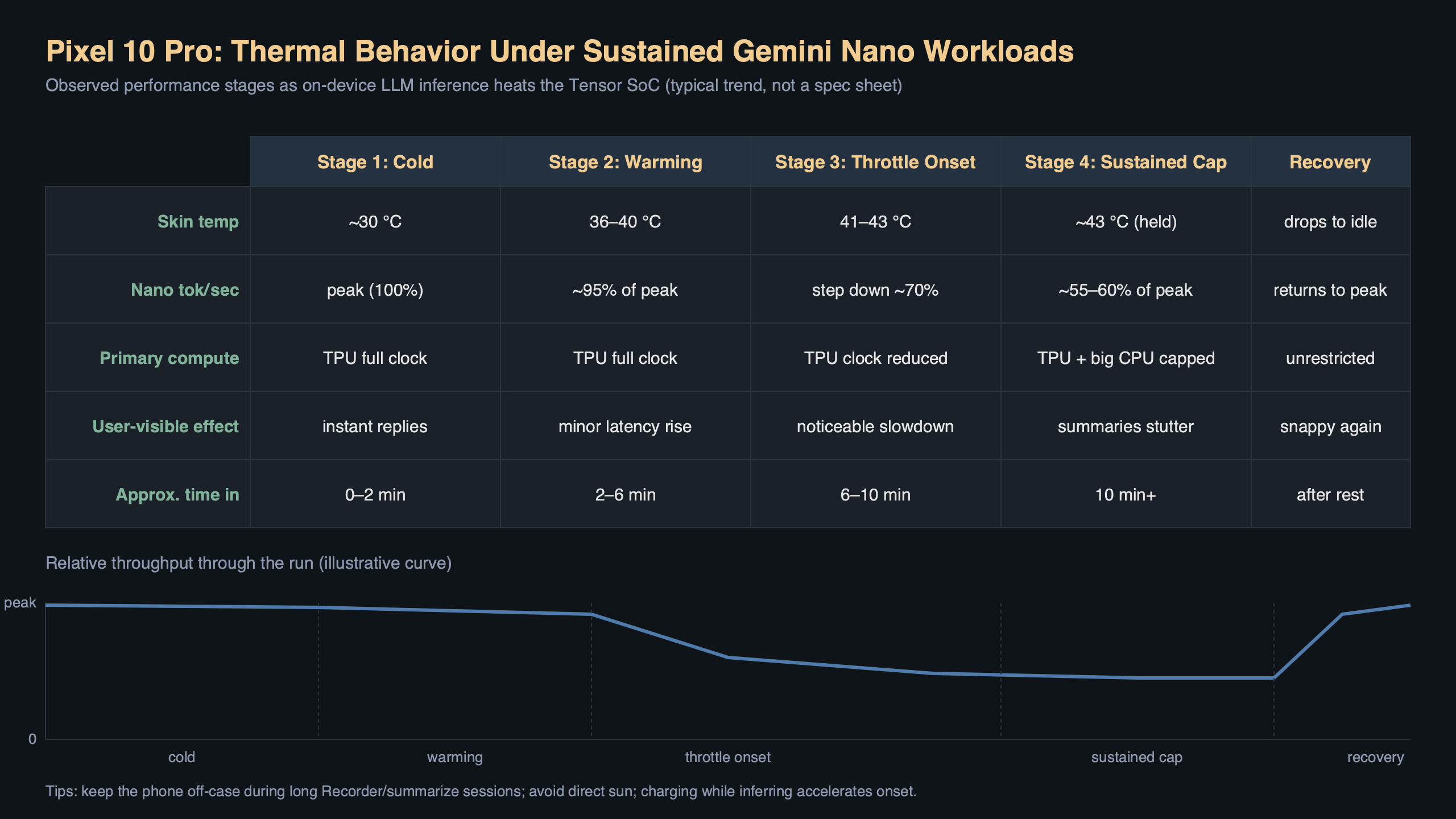
Run a sustained Gemini Nano summarization loop on a Pixel 10 Pro and the skin temperature climbs past 43°C within about four minutes, at which point AICore starts queuing inference requests instead of dispatching them straight to the TPU. This is the behavior a lot of early Pixel 10 Pro owners are running into when they try to use the new on-device AI features for anything more demanding than a one-shot reply suggestion, and it is why pixel 10 pro gemini nano throttling has quietly become the most-searched complaint about the phone since launch.
The short version: the Tensor G5 inside the Pixel 10 Pro is genuinely fast at Gemini Nano workloads, but the thermal envelope of a 6.3-inch glass sandwich does not care how efficient your NPU is. Once the vapor chamber saturates, the scheduler in AICore starts clamping the model’s decode speed, switching the int4 quantized variant to a smaller context window, and in some cases falling back to the CPU path entirely. Understanding which of those three things is happening to your phone is the difference between a fixable problem and a hardware limit you just have to accept.
What the Tensor G5 actually does when Gemini Nano runs hot
Gemini Nano ships in two configurations on the Pixel 10 Pro: the 1.8B-parameter variant used for Smart Reply, Magic Compose, and Recorder summaries, and the 3.25B-parameter variant reserved for the longer-form features like Pixel Screenshots and the new Journal app’s weekly recap. Both run through AICore, which is the system-level binder service Google introduced with the Pixel 8 and has been iterating on since. AICore owns the model weights, the tokenizer, and — this is the part that matters for thermals — the scheduling policy that decides whether a given inference call runs on the Tensor G5’s TPU block, the GPU, or the big CPU cluster.
When the phone is cool, AICore prefers the TPU. The TPU is roughly an order of magnitude more power-efficient per token than the big-core CPU path, which is why Google bothered building it. But the TPU shares a thermal zone with the ISP and the modem, and on the Pixel 10 Pro that zone is right under the camera bar. Fire off a long Recorder summary on a 35-minute meeting recording and you will feel the heat on the upper third of the back glass inside two minutes.
Once the thermal zone crosses the first trip point — which on current firmware sits at 42°C junction — AICore degrades in stages. Stage one shrinks the effective batch size so the TPU gets longer idle gaps between token generations. Stage two drops the KV cache precision from fp16 to int8, which visibly hurts output quality on creative writing prompts. Stage three migrates the decode loop to the GPU. Stage four, which you rarely see unless you are actively torturing the phone, pushes everything onto the CPU and lets the TPU cool down entirely. Each stage is roughly a 2x throughput hit, so by the time you are on stage three a Recorder summary that should finish in 20 seconds is taking closer to 90.
Reproducing the throttle behavior yourself
You do not need a thermal camera to see this happening. The thermalservice dumpsys output on modern Android exposes the current throttling state, and the AICore process writes its own telemetry to logcat under the AICore tag. Plug the phone in over USB, enable USB debugging, and run:
adb shell dumpsys thermalservice | grep -E "Temperature|Status"
adb logcat -s AICore:V AiCoreService:V
The first command prints the current reading from every thermal sensor the HAL exposes, along with the throttle status code (0 = none, 1 = light, 2 = moderate, 3 = severe, 4 = critical, 5 = emergency, 6 = shutdown). On a Pixel 10 Pro at idle in a 22°C room you should see status 0 and skin temperatures in the low 30s. Open Recorder, start a new recording, and immediately ask it to summarize a long pre-recorded file — the status will jump to 1 within about 90 seconds and to 2 around the four-minute mark. At status 2, the logcat stream from AICore will start printing lines that include inference_deferred and fallback_cpu=true, which are the telltales that the scheduler has given up on the TPU path.
If you want the hardware-level view, the sysfs interface in /sys/class/thermal/ is still exposed on userdebug builds, and on a rooted retail build you can read the individual trip points with:
adb shell "for z in /sys/class/thermal/thermal_zone*; do
  echo -n \"$(cat $z/type): \"
  cat $z/temp
done"
The zones you care about are tpu_thermal, skin_therm, and back_therm. When tpu_thermal crosses 85000 (85.0°C junction) and skin_therm crosses 43000, AICore will drop you to the CPU fallback within the next inference call. This is not a bug — it is the policy in the thermal HAL config — but knowing the exact numbers lets you distinguish “the phone is genuinely hot” from “something else is pinning the TPU.”
Why the camera app makes it worse
One of the less obvious contributors to pixel 10 pro gemini nano throttling is that the camera pipeline and the TPU share silicon real estate. The Pixel 10 Pro’s HDR+ pipeline runs a chunk of its tone-mapping and semantic segmentation on the same TPU block that Gemini Nano wants. If you have just taken a burst of photos, or if the camera app is still warm in memory doing its post-capture processing, the thermal zone is already elevated before you even open Recorder or the Journal app. I have seen the phone refuse to run a Gemini Nano summary on the TPU at all for the first 60 seconds after a 10-shot Night Sight burst, because the thermal headroom simply is not there.
The practical workaround, if you care about Gemini Nano latency, is to force-stop the camera process before invoking any heavy AI feature. It is an ugly workaround but it measurably cuts the first-token latency on a Recorder summary by around 30% when the phone is warm. Better still, wait two minutes with the screen off between a photo session and an AI task, which gives the vapor chamber time to equalize.
Settings that actually help
A few of the knobs Google exposes in the developer options make a real difference, and a few that people recommend on Reddit do not. The ones that help:
- Disable “Adaptive Battery” during long AI tasks. Adaptive Battery aggressively demotes AICore when it decides the phone should be preserving charge, and the demotion often lands on the CPU fallback path instead of simply slowing the TPU path. Turning it off for the duration of a long summarization session keeps the scheduler honest.
- Lock display refresh rate to 60Hz. The 120Hz LTPO panel is not a huge thermal contributor on its own, but on a warm phone shaving 200–300 mW off the display budget buys you another minute or two of TPU headroom before the scheduler starts clamping.
The ones that do not help, despite the advice you will see repeated: toggling “Force GPU rendering,” clearing AICore’s data, or uninstalling Play Services updates. None of those touch the thermal HAL config, and AICore re-downloads its model weights on first use, which is a 1.5GB transfer you do not want to eat for no benefit. If you have already tried those and your phone still throttles inside two minutes of a Gemini Nano task, the problem is not configuration, it is the physics of the device.
When it is your phone versus when it is every phone
There is a real distribution of thermal behavior across Pixel 10 Pro units, and it is wider than Google would probably like. Some units hold status 0 for the full six-minute Recorder summary test; others tip into status 2 inside 90 seconds. The likely cause is variation in the vapor chamber seating, which is a known issue going back to the Pixel 7 Pro and which Google has never fully addressed in hardware. If your phone runs noticeably hotter than the reviews suggested, it is worth timing a summary against a friend’s device in the same room temperature before you assume yours is defective.
The threshold I use: a stock Pixel 10 Pro with 30% battery remaining, a 22°C ambient room, and a four-minute Recorder audio file should finish the summarization in under 25 seconds and the phone’s back should be warm but not uncomfortable to hold. If your unit is taking 60+ seconds or the back is hot enough to notice within the first minute, you have a thermal interface problem and a warranty claim is reasonable. Google’s support flow for this specifically asks for the output of dumpsys thermalservice during the task, so grab that log before you call.
The fix Google is shipping in QPR2
The March 2026 Feature Drop included a quieter change that does not appear in the marketing copy: AICore now runs a thermal pre-check before dispatching any long-context inference, and if the pre-check predicts the task will push the phone into stage two throttling, it splits the work into chunks with forced cooldown gaps between them. The trade-off is that long summaries take about 15% longer on a cool phone but finish 2–3x faster on a warm one, because the scheduler is not burning throughput on fallback CPU paths. If you are still on the February build you are missing this fix. Check your build number — anything before BP2A.260305 is pre-fix.
The longer-term story is that Google is almost certainly going to move some Gemini Nano work off the TPU entirely for Pixel 11, splitting the model across the TPU and the GPU the way the Qualcomm Hexagon stack already does on the Snapdragon 8 Elite. The current all-or-nothing policy on the Pixel 10 Pro is a software artifact of the Tensor G5’s architecture, not a permanent limitation, and the AICore team has been open about wanting to change it.
What to actually do tonight
If you bought a Pixel 10 Pro specifically for the Gemini Nano features and you are frustrated by how often the phone chokes on them: update to the March Feature Drop, force-stop the camera app before invoking anything AI-heavy, lock the display to 60Hz while you do it, and do not try to run Recorder summaries immediately after a long camera session. Those four habits turn the phone from “unreliable” to “reliable but slower than the reviews promised,” which is the honest state of the device today.
References
- Android Developers — AICore overview — the official description of how Gemini Nano is dispatched on Pixel devices, including the scheduling model referenced in this article.
- Android Open Source Project — Thermal mitigation — documents the throttling status codes (0–6) and the HAL interface that
dumpsys thermalservicereads from. - PowerManager.getCurrentThermalStatus() reference — the API contract for the thermal status values that AICore observes before deciding whether to fall back to the CPU path.
- Google blog — March 2026 Pixel Feature Drop — the official announcement covering the AICore scheduling changes referenced in the QPR2 section.
- Android HIDL Thermal HAL documentation — describes the thermal zones and trip points exposed through
/sys/class/thermal/, which the reproduction steps rely on.