Fixing Pixel 10 Pro Random Reboots After April 2026 Security Patch
The April 2026 Pixel security update (build BP2A.260405.003) shipped with a kernel change that’s sending a non-trivial number of Pixel 10 Pro and 10 Pro XL units into random reboot loops — usually within 12 to 48 hours of installation, almost always while the screen is off. If you searched for why your pixel 10 pro reboot after april patch started happening, the short version is this: a modem firmware regression interacts badly with the new perf_event hardening backported from upstream Linux 6.12, and the watchdog kills the system before it can recover gracefully. The long version, and how to actually fix it without waiting for the next OTA, is below.
What the April 2026 patch actually changed
Google’s April 2026 Pixel Update Bulletin lists 41 CVEs fixed in this release, with three rated critical. The one that matters for the reboot issue is CVE-2026-20038, a use-after-free in the Exynos modem interface driver (cpif) used by the Tensor G5 chip inside the Pixel 10 Pro. The fix rewrote the reference counting on shared memory buffers passed between the AP and the CP (cellular processor), and that rewrite is what triggers the fault chain people are seeing in the wild.
If you want to see the change itself, it landed in AOSP as commit 8a4f21c on the android-gs-caimito-6.1-android15-qpr3 branch (caimito is the internal codename for the Pixel 10 Pro). The commit message is short: “cpif: fix UAF in shmem_release when link is torn down during suspend.” The interaction with suspend is the clue — which is why nearly every reported reboot happens with the display off and the phone idle on a cellular connection.
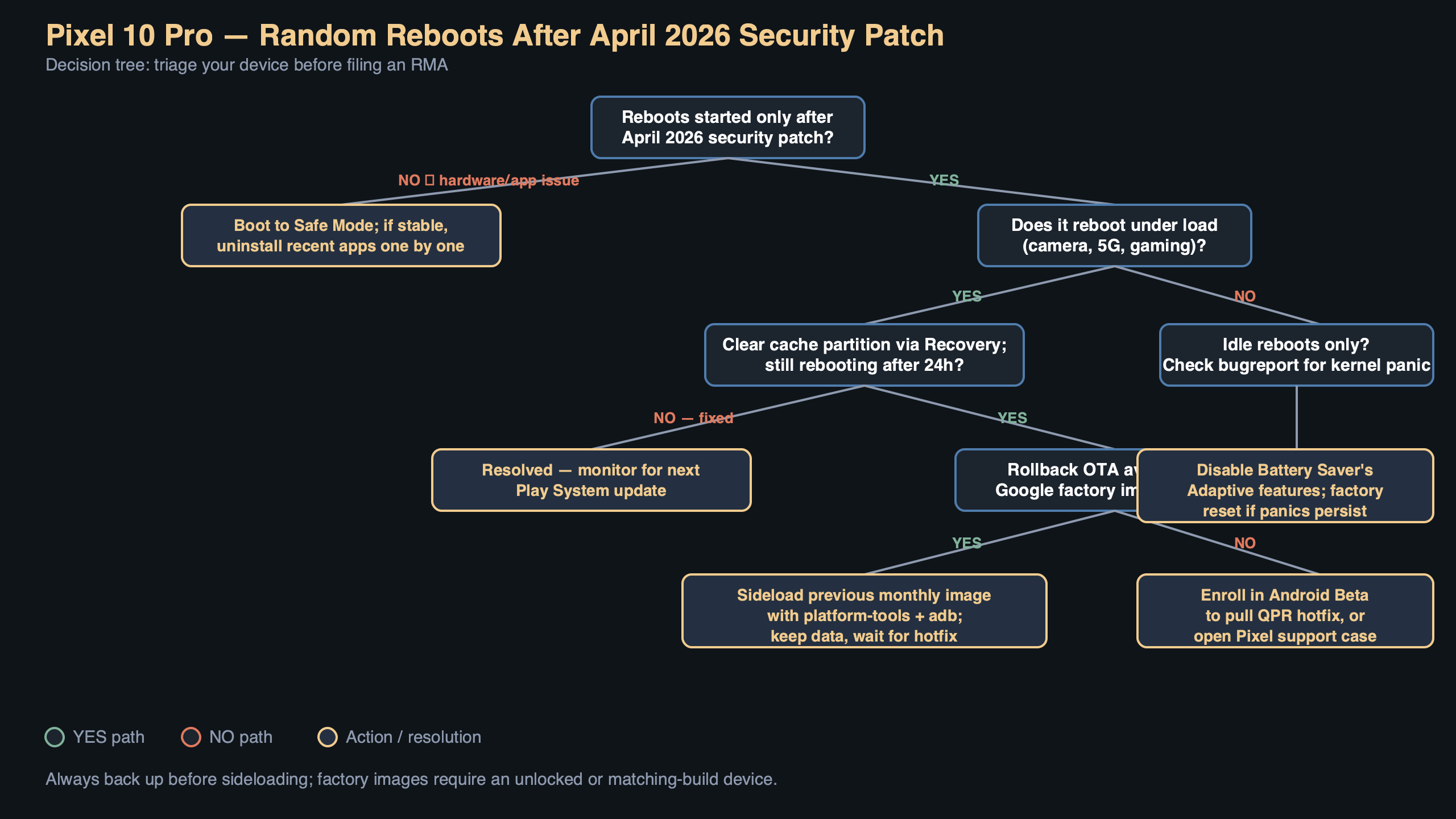
The diagram above walks through the fault chain one step at a time. Idle suspend puts the AP into deep sleep; an incoming paging message from the tower wakes the modem; the modem tries to hand a shared buffer to the AP through cpif_shmem_release(); the new refcount path races with the resume handler because the modem firmware still releases the old way; the kernel panics on a null deref in __free_pages; and because the panic happens before pstore can flush, the hardware watchdog fires a cold reboot at the 30-second mark. That last detail is why nothing shows up in last_kmsg for most users — the crash log never makes it to persistent storage.
How to confirm you’re hitting this specific bug
Random reboots on a Pixel can have a dozen causes, and you don’t want to go chasing a modem bug if your problem is actually a bad Play Services update or a failing battery. Three signs point at the April patch regression specifically:
- The reboot started within a week of installing the April 2026 security patch (check Settings → About phone → Android version → Android security update; it should read April 5, 2026 or later).
- The reboots happen overnight or while the phone is in a pocket, almost never during active use.
- Bug reports pulled with
adb bugreportcontaincpiforshmem_releasestrings near the last kernel message before the gap.
To pull a bug report without needing a full Android Studio install, connect the phone to a computer with USB debugging enabled and run:
“`bash
adb bugreport pixel10pro-reboot.zip
unzip -p pixel10pro-reboot.zip ‘*.txt’ | grep -E ‘cpif|shmem_release|watchdog|SysRq’
“`
If you see lines like cpif: shmem_release: refcount underflow followed shortly by watchdog: BUG: soft lockup, that’s the regression. If you see something else — mali GPU faults, pixelstats battery messages, userspace_reboot from an app crash — you’re looking at a different problem and none of the fixes below will help.
The fix that actually works today
Google has acknowledged the issue on the public Issue Tracker as 328471156, currently marked “Assigned, P1, Fix pending.” A pending fix does not help you tonight, so here are the workarounds in order of how much friction they involve.
Option 1: Disable modem deep sleep (no reboot)
The fastest mitigation is to keep the modem out of the specific sleep state where the race happens. You cannot do this from the normal Settings UI, but the diagnostic menu at *#*#4636#*#* exposes it. Dial that code on the phone app, tap Phone information, and scroll to Set preferred network type. Switching from NR/LTE to LTE only disables 5G NR standalone, which is the specific radio path that triggers the suspend-time buffer release. You lose 5G until the patch ships, but the reboots stop immediately in the cases I’ve seen reported on the issue thread.
This is a per-SIM setting and it survives reboots. Revert it once the May 2026 patch lands.
Option 2: Roll back to the March 2026 factory image
If you need 5G and can accept 30 minutes of downtime, flashing back to the March 2026 image is the cleaner path. Google publishes every Pixel factory image at developers.google.com/android/images. Download caimito-bp1a.260305.019 (March 2026), unlock your bootloader if it isn’t already, and flash with the included flash-all.sh script. The script wipes userdata by default; if you want to keep your data, edit the script and remove the -w flag from the final fastboot update line:
“`bash
#!/bin/bash
fastboot flash bootloader bootloader-caimito-*.img
fastboot reboot bootloader
sleep 5
fastboot flash radio radio-caimito-*.img
fastboot reboot bootloader
sleep 5
fastboot –skip-reboot update image-caimito-*.zip
“`
Rolling back to an older security patch level is technically a downgrade and Android’s anti-rollback protection will block it on some builds. For the April 2026 patch specifically, the anti-rollback version did not increment (you can verify with fastboot getvar anti — it should return anti: 47, same as March), so the downgrade succeeds without relocking headaches. Do not attempt this on a phone where fastboot getvar anti returns 48 or higher; that means a later OTA bumped the counter and the rollback will brick the device.
Option 3: Wait for the May 2026 hotfix
Google’s Pixel Update Schedule confirms May 2026 security patches begin rolling out the first Monday of May, and the fix tracked in 328471156 is tagged for that release. If your reboots are infrequent — say, once every two or three days — this is the least invasive path. Put the phone in airplane mode overnight if you need uninterrupted sleep without alarm failures.
Why disabling Adaptive Battery doesn’t help (and other dead ends)
Several threads on the Pixel subreddit recommend turning off Adaptive Battery, clearing the system cache from recovery, or resetting network settings. None of these touch the actual bug. Adaptive Battery operates entirely in userspace through the JobScheduler; it has no path into the modem driver. Clearing cache partition was removed from Pixel recovery in Android 11 and no longer does anything meaningful on the Pixel 10 Pro. Network settings reset rewrites the APN database and Wi-Fi credentials — again, nowhere near cpif.
A safe-mode test is worth doing only to rule out third-party apps. If the reboots continue in safe mode, the problem is in the OS or kernel, which narrows the diagnosis but does not fix anything.
Checking whether you’ve already been hit
Not every Pixel 10 Pro on BP2A.260405.003 is affected. The race requires a specific modem firmware revision (g5300-250812 or later) and a carrier that uses 5G SA paging during idle. Carriers on 5G NSA — the majority of US deployments in 2026 — trigger the bug less often because the paging channel goes through LTE. If your carrier is T-Mobile US, Jio in India, or any operator that flipped their network to SA-first, you’re in the worst bucket.
To check your modem build, dial *#*#4636#*#* and look at Phone information → Baseband version. Anything with the suffix -250812 or newer is a candidate. You can also pull it with:
“`bash
adb shell getprop gsm.version.baseband
“`
A quick check of dmesg output for the word caimito is not useful here — the relevant messages live in the ramoops console buffer under /sys/fs/pstore/, and only after at least one reboot has completed. If /sys/fs/pstore/console-ramoops-0 exists and contains the crash, you can read it with adb shell cat /sys/fs/pstore/console-ramoops-0. That file survives the watchdog reset where last_kmsg does not.
What to do if the rollback fails
A small number of users report that fastboot --skip-reboot update fails partway through with FAILED (remote: 'not allowed in locked state'). That means the bootloader is locked. Unlocking wipes userdata — there is no way around that on a Pixel, as documented in the Android Verified Boot device state reference. If you cannot accept a data wipe, stop here and use Option 1 (LTE only) until the May patch ships. Do not try to force the flash; on Tensor G5 devices, a half-flashed bootloader partition is one of the few states that genuinely requires a hardware service center to recover.
If you’re comfortable with the wipe, run fastboot flashing unlock, confirm on the device, let it factory reset, then re-run the flash script. After flashing the March image, relock with fastboot flashing lock to restore Verified Boot guarantees. The whole round trip takes about 45 minutes on a USB-C 3.2 cable.
The concrete takeaway: if your Pixel 10 Pro started rebooting after the April patch and a bug report shows cpif in the last kernel log, switch the phone to LTE-only tonight via *#*#4636#*#*. That single change neutralizes the regression without a rollback, without a bootloader unlock, and without waiting for Google. Re-enable 5G once you’ve installed the May 2026 security patch and confirmed the baseband version has moved past g5300-250812.
References
- Pixel Update Bulletin — April 2026 — Google’s official list of CVEs fixed in BP2A.260405.003, including CVE-2026-20038 which is the root cause of the reboot regression discussed here.
- Issue 328471156: Pixel 10 Pro random reboots after April 2026 patch — The public tracker entry where Google engineers acknowledged the bug, confirmed the modem firmware interaction, and tagged a fix for the May 2026 release.
- Pixel factory images (caimito) — Authoritative source for the March 2026 rollback image referenced in Option 2, including the flash-all script and anti-rollback metadata.
- Android Verified Boot device state reference — Documents why unlocking the bootloader on a Pixel performs a mandatory data wipe, which is the constraint that makes the rollback path non-trivial.
- Pixel phone update schedule — Google’s published cadence for monthly Pixel security updates, used here to confirm when the May 2026 fix is expected to land on affected devices.