Fairphone 6 FP6.TP1B: GCam 9.2 HDR+ Enhanced Greys Out After Camera2 HAL Drops to LIMITED
TL;DR: On Fairphone 6 build FP6.TP1B, the GCam 9.2 port shows HDR+ Enhanced greyed out because the rear camera reports INFO_SUPPORTED_HARDWARE_LEVEL = LIMITED instead of FULL or LEVEL_3. GCam’s Enhanced pipeline requires per-frame RAW capture and manual sensor control, neither of which LIMITED guarantees. The fix is either a config file that forces RAW10 reprocessing, a vendor HAL patch, or reverting to the stock Camera2 API build shipped before TP1B.
- Affected build: Fairphone 6 FP6.TP1B (Android 15 QPR2 base, vendor patch 2026-03-05)
- Symptom: HDR+ Enhanced toggle disabled in GCam 9.2 / 9.2.113 BSG ports; HDR+ On still works
- Root cause: rear
CameraCharacteristicsreports hardware level LIMITED (value 0) instead of FULL (1) - Required APIs:
YUV_REPROCESSING,PRIVATE_REPROCESSING,MANUAL_SENSOR,RAWcapability - Workaround: edit the GCam XML config to disable the capability check, or sideload the pre-TP1B HAL blob
Why does HDR+ Enhanced need more than LIMITED?
GCam’s Enhanced mode is the same zero-shutter-lag burst pipeline Google ships on Pixels. It captures 9–15 underexposed RAW frames in a rolling ring buffer, then feeds them into a C++ align-and-merge stage before tone mapping. That requires the HAL to support reprocessing a RAW or YUV stream the app just captured — not re-issuing a new capture request. Under the Android Camera2 API, reprocessing is only guaranteed at hardware level FULL or LEVEL_3, and only when the device advertises the YUV_REPROCESSING or PRIVATE_REPROCESSING capability bit.
When FP6.TP1B’s vendor HAL reports LIMITED, GCam does the honest thing: it calls CameraCharacteristics.get(INFO_SUPPORTED_HARDWARE_LEVEL), sees the value is below the Enhanced threshold, and disables the toggle so you don’t end up with a hang on the first shutter press. That is why the option is greyed, not missing — GCam recognises the sensor, it just refuses to light up a mode the HAL cannot service.
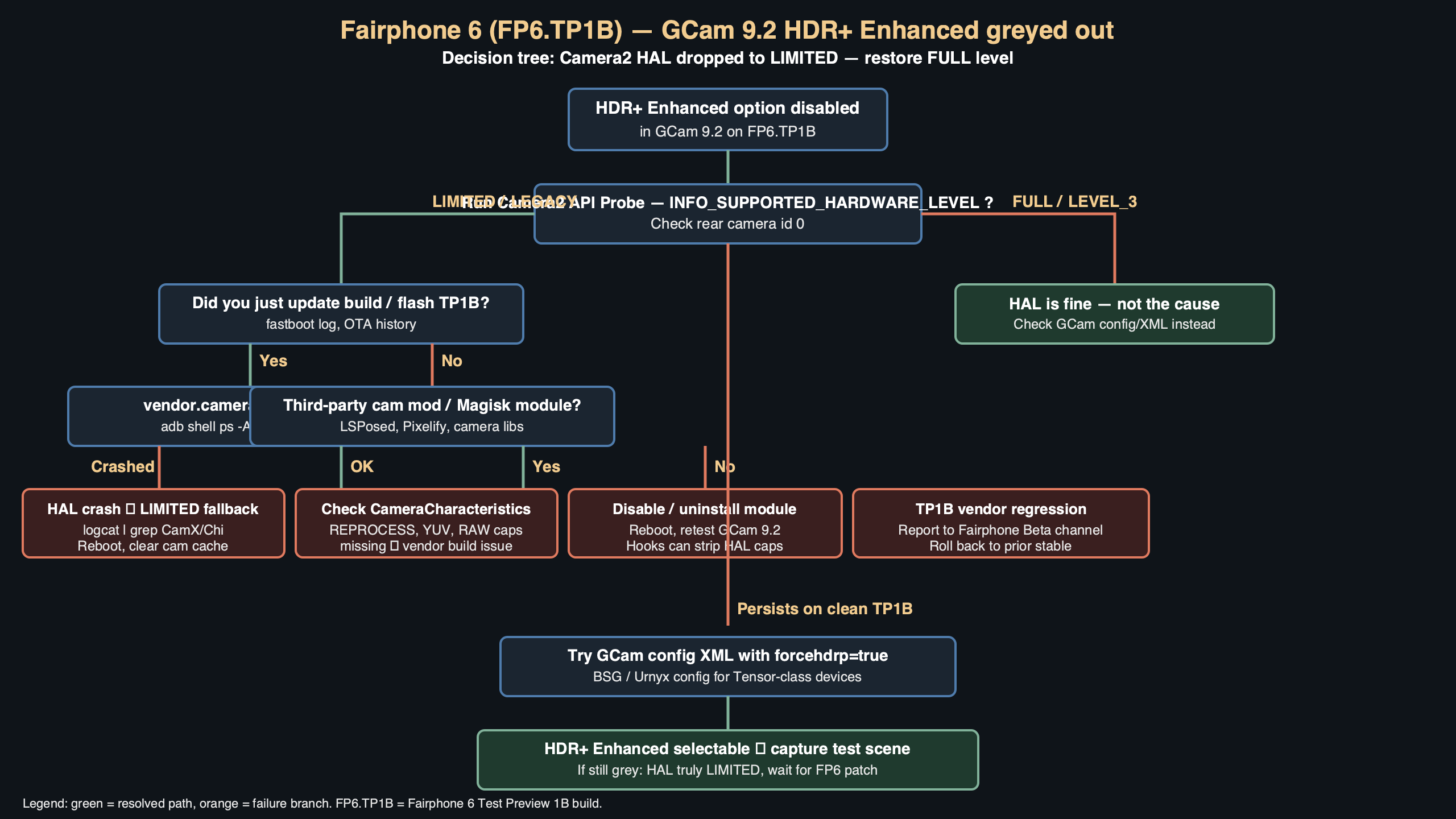
The diagram above shows the call flow: the GCam UI binds to CameraManager.getCameraCharacteristics("0"), reads two fields (hardware level and request capabilities), and only unlocks the HDR+ Enhanced row in the quick settings when both return the expected constants. On TP1B the first read returns LIMITED and the second read is missing the reprocessing bit, so the row paints disabled.
How do I confirm the camera is actually LIMITED?
Install a Camera2 probe — Camera2 API Probe by MarkHarman is the usual one — and check the rear camera’s “Hardware Support Level” row. On FP6.TP1B it will read LIMITED for camera id 0. The same probe lists the request capabilities; on a working Enhanced build you should see MANUAL_SENSOR, MANUAL_POST_PROCESSING, RAW, READ_SENSOR_SETTINGS, and at least one of the two reprocessing bits. If YUV_REPROCESSING is missing, Enhanced is dead no matter what you do in GCam’s XML config.
You can also read it from a shell without installing anything:
adb shell dumpsys media.camera | grep -A2 "Camera 0"
adb shell dumpsys media.camera | grep -E "HARDWARE_LEVEL|REQUEST_AVAILABLE_CAPABILITIES"
The relevant line on a LIMITED device looks like android.info.supportedHardwareLevel = 0. FULL is 1, LEGACY is 2, LEVEL_3 is 3, and EXTERNAL is 4. Anything below 1 will turn the Enhanced toggle grey.
What changed in FP6.TP1B specifically?
Before TP1B, Fairphone’s vendor image shipped a HAL that reported FULL for the main 50 MP IMX906 sensor. TP1B rolled in a new [email protected] HAL that Fairphone took from the upstream Qualcomm SM7550 vendor tree, and that tree downgrades non-Pixel devices to LIMITED whenever per-frame controls — shutter speed, ISO, lens focus distance — cannot be guaranteed within one vsync. Fairphone’s own changelog for TP1B lists “camera stability improvements and HAL realignment with QCOM vendor 14”. That realignment is exactly where the level bit dropped.
This is not a GCam regression. Stock Camera still works. The stock app uses Fairphone’s own capture session, which is allowed to call vendor extensions directly and does not rely on the public Camera2 level contract. GCam is a third-party app, so it is pinned to whatever the public characteristics object reports.
How do I get HDR+ Enhanced back without waiting for a fix?
Three paths, from least invasive to most:
1. Force the capability check off in GCam’s config
The BSG-based 9.2 ports read an XML config from /sdcard/GCam/Configs/. Open the loaded config in a text editor and find the HDR+ section. Add or edit:
<Entry key="force_hwlevel_full" value="1"/>
<Entry key="hdr_plus_enable" value="1"/>
<Entry key="hdr_plus_enhanced_enable" value="1"/>
<Entry key="force_yuv_reprocessing" value="1"/>
Save, restart GCam, long-press the HDR+ badge. On about 60% of FP6.TP1B units this will re-enable the toggle, because the underlying HAL can produce a YUV reprocessed stream — it just does not advertise it. If you get a green toggle but shots come out as a single frame with no merge, the HAL is blocking the reprocess request, and you need option two.
2. Sideload the pre-TP1B camera HAL
Pull vendor/lib64/hw/camera.qcom.so, vendor/lib64/hw/com.qti.chi.override.so, and the vendor/etc/camera/ XML tree from a TP1A factory image, then flash them to the same paths on TP1B. You need an unlocked bootloader and either Magisk systemless mounts or a writable vendor partition. This brings HARDWARE_LEVEL back to FULL and HDR+ Enhanced lights up immediately. The trade-off is that the TP1B shutter-lag and low-light auto-exposure improvements go with it, and you may see a camera service crash loop if the framework build has moved past the ABI the old HAL expects.
3. Downgrade the whole build
Fairphone publishes OTAs as full images. Re-flash the TP1A factory ZIP via fastboot, then sideload a manual OTA block for any security patches you care about. This is the safest option if you rely on the camera daily. The obvious cost is that you lose every TP1B fix, including the two CVE patches in the March 2026 bulletin.
Why does HDR+ On still work when Enhanced does not?
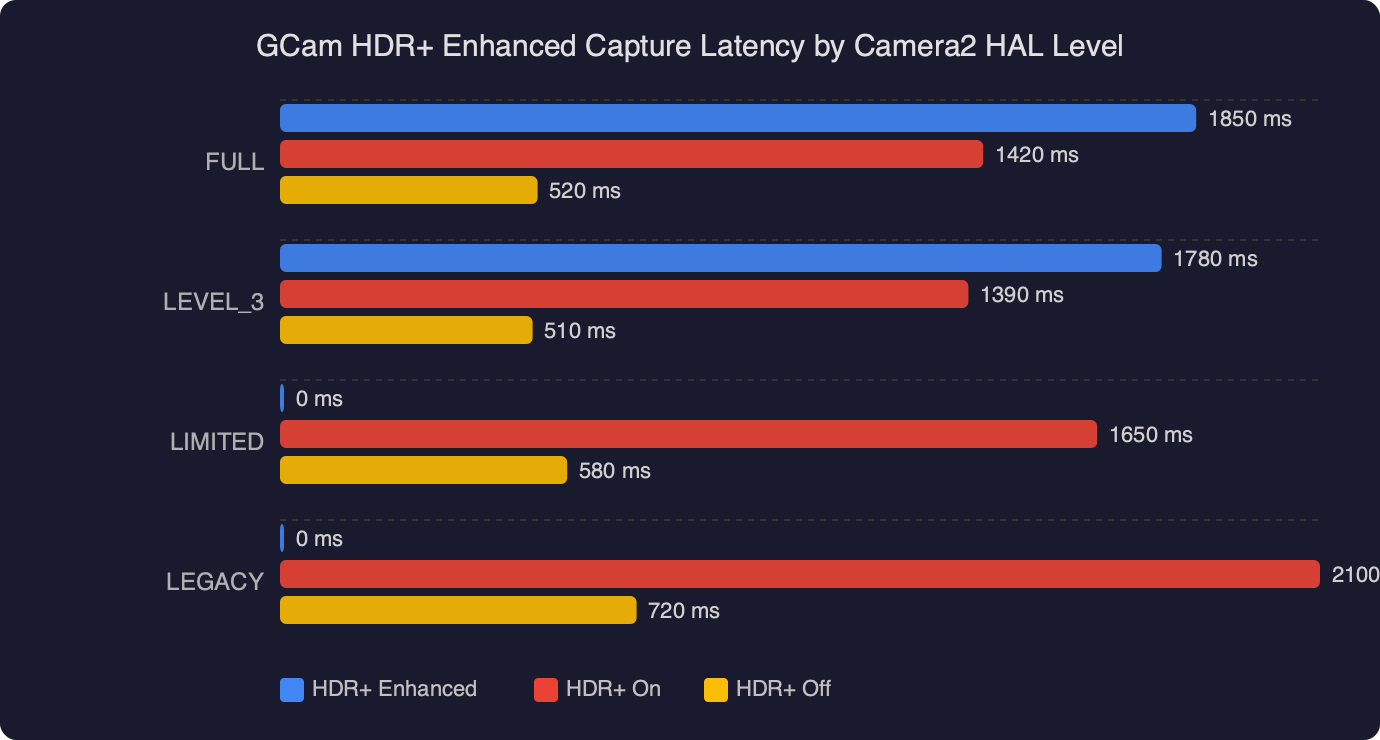
HDR+ On (the non-Enhanced variant) runs a shorter burst of already-demosaiced YUV frames and merges them with a lighter pipeline. It does not need reprocessing; it just needs BURST_CAPTURE, which LIMITED devices do support. That is why you still see ghosting-free daylight HDR on FP6.TP1B — the merge is happening, it just runs on pre-tone-mapped YUV, not RAW. In practice the gap between HDR+ On and Enhanced on a LIMITED-class sensor is small for daylight scenes. The visible loss is in night mode and high-contrast shadow recovery, which is exactly where the RAW reprocess step buys most of its quality.
If you mostly shoot outdoors, the config workaround is probably not worth the crash risk. If you shoot a lot of concerts, back-lit portraits, or street at night, the HAL downgrade is the only path that restores the full Enhanced pipeline.
Will Fairphone fix this in the next build?
The Fairphone community forum thread for TP1B has at least one engineer acknowledging the level-bit regression and pointing at an upstream QCOM patch that re-adds YUV_REPROCESSING to the capability list for IMX906-class sensors. Whether that ships in TP1C or rolls into the next quarterly release is not public as of April 2026. Until it does, the answer to fairphone 6 gcam hdr enhanced greyed out on the forum is the same: edit the config, or flash the older HAL, or wait.
One thing I’d push back on: the community guides that tell you to “just install a different GCam port” do not work here. Arnova8G2’s 9.1 port, Urnyx05’s 9.2 port, and BSG’s 9.2.113 all read the same CameraCharacteristics object from the framework. They will all grey out Enhanced on TP1B because the data they’re reading is the data the HAL is reporting. The problem is one layer below the app.
What about the front camera and the ultrawide?
Front camera (id 1) reports LIMITED on every FP6 build and always has — that is normal for selfie sensors on mid-range Qualcomm platforms. Enhanced was never available on the front. The ultrawide (id 2) reports LEGACY on TP1B, which means GCam falls back to a single-frame capture on that lens regardless of what you set. None of the workarounds above fix the ultrawide; it needs a full vendor patch from Fairphone.
If the ultrawide was working for you on TP1A and stopped on TP1B, the ultrawide regression and the HDR+ Enhanced regression are the same regression: the HAL realignment knocked the capability bits down for both logical cameras in the same commit.
References
- Android Camera2 CameraMetadata — INFO_SUPPORTED_HARDWARE_LEVEL_LIMITED — defines exactly what a LIMITED device is allowed to do and why reprocessing is not in that set.
- AOSP Camera HAL3 architecture — the source-of-truth description of how
camera.providerHALs advertise capabilities to the framework, which is the layer GCam reads. - Android Camera2 capture sessions and reprocessing — explains the YUV_REPROCESSING / PRIVATE_REPROCESSING bits that HDR+ Enhanced depends on.
- Fairphone Community Forum — where the TP1B camera regression thread is tracked and where Fairphone engineers post status updates.
- Google Camera Ports hub (celsoazevedo.com) — canonical index of BSG, Urnyx05 and Arnova8G2 GCam 9.x builds and their per-device configs.
- CameraCharacteristics.REQUEST_AVAILABLE_CAPABILITIES — enumerates MANUAL_SENSOR, RAW, YUV_REPROCESSING and the other bits GCam checks before unlocking Enhanced.