Inside Android stylus latency: how front-buffer rendering drops ink
On a 60 Hz Android tablet, the active tip of a stylus stroke can land on the display roughly 9 milliseconds after a fresh sample arrives from the pen while it is still in contact with the glass. That figure is not a round number pulled from a marketing slide. It is what survives once an app uses the AndroidX graphics-core front-buffer rendering path, which writes the current ink segment straight into the surface the display is already scanning out instead of routing it through SurfaceFlinger composition. The catch: that window covers only the active stroke. The completed line rejoins the standard double-buffered pipeline the moment you lift the pen.
- Front-buffer rendering is exposed through AndroidX graphics-core via GLFrontBufferedRenderer (OpenGL ES) and CanvasFrontBufferedRenderer (android.graphics.Canvas).
- Skipping the SurfaceFlinger composition pass removes roughly one full 60 Hz vsync interval (~16.6 ms) from the touch-to-photon path.
- The ~9 ms figure is an order-of-magnitude active-stroke latency on a 60 Hz panel, not a guaranteed spec; higher-refresh-rate hardware shrinks that window further because both the vsync interval and the scanout stage are shorter.
- MotionEventPredictor (AndroidX input motion-prediction) is a separate technique that extrapolates the next pen position from recent samples. It is complementary to front-buffer rendering, not a substitute.
- Front-buffer rendering is not safe for content that needs alpha-blending with underlying UI. It is designed for the wet-ink overlay of an active stroke, nothing else.
The 9 ms number, and what it actually measures
The first thing to fix is what “stylus latency” even refers to. End-to-end pipeline latency — pen tip moves, the new pixel appears under it — is one quantity. Active-stroke latency, which is what the 9 ms figure measures, is the time between a fresh stylus sample arriving while the pen is in contact and the first appearance of a corresponding pixel during the stroke, with motion prediction layered on top. They are not the same number, and the rest of the SERP routinely conflates them.
The ~9 ms figure corresponds to the active-stroke window on a 60 Hz pipeline once the compositor wait is removed and prediction is layered on top — not the round-trip from pen sample to a fully composited frame containing every other layer. Independent measurement work — Tom Buckley’s “Measuring Stylus Latency” writeup is one of the few public methodologies — uses high-frame-rate slow-motion video and a marked stylus to count frames between physical movement and on-screen response. That is the only way to attribute milliseconds to specific stages of the pipeline rather than asserting them, and the figures used throughout this piece should be read as illustrative budgets in that spirit, not as instrumented measurements from a specific device.
There is a longer treatment in modern panel tech.
The version of the question worth answering is therefore: where does the time actually go, and which mitigation actually removes which milliseconds?
Walking the touch-to-photon pipeline, millisecond by millisecond
Six stages sit between a pen sample and a lit pixel. Every competitor article gestures at this pipeline; almost none of them publish the budget. The ranges below are best read as an illustrative breakdown of where time accumulates rather than as numbers lifted from a single source. They are consistent with the architectural descriptions in the AOSP graphics architecture documentation, public Android Developers talks on low-latency input, and the public AndroidX graphics-core source, but the exact millisecond values vary substantially by device, panel, digitizer, and app, and the table should be treated as a teaching aid rather than a measurement.
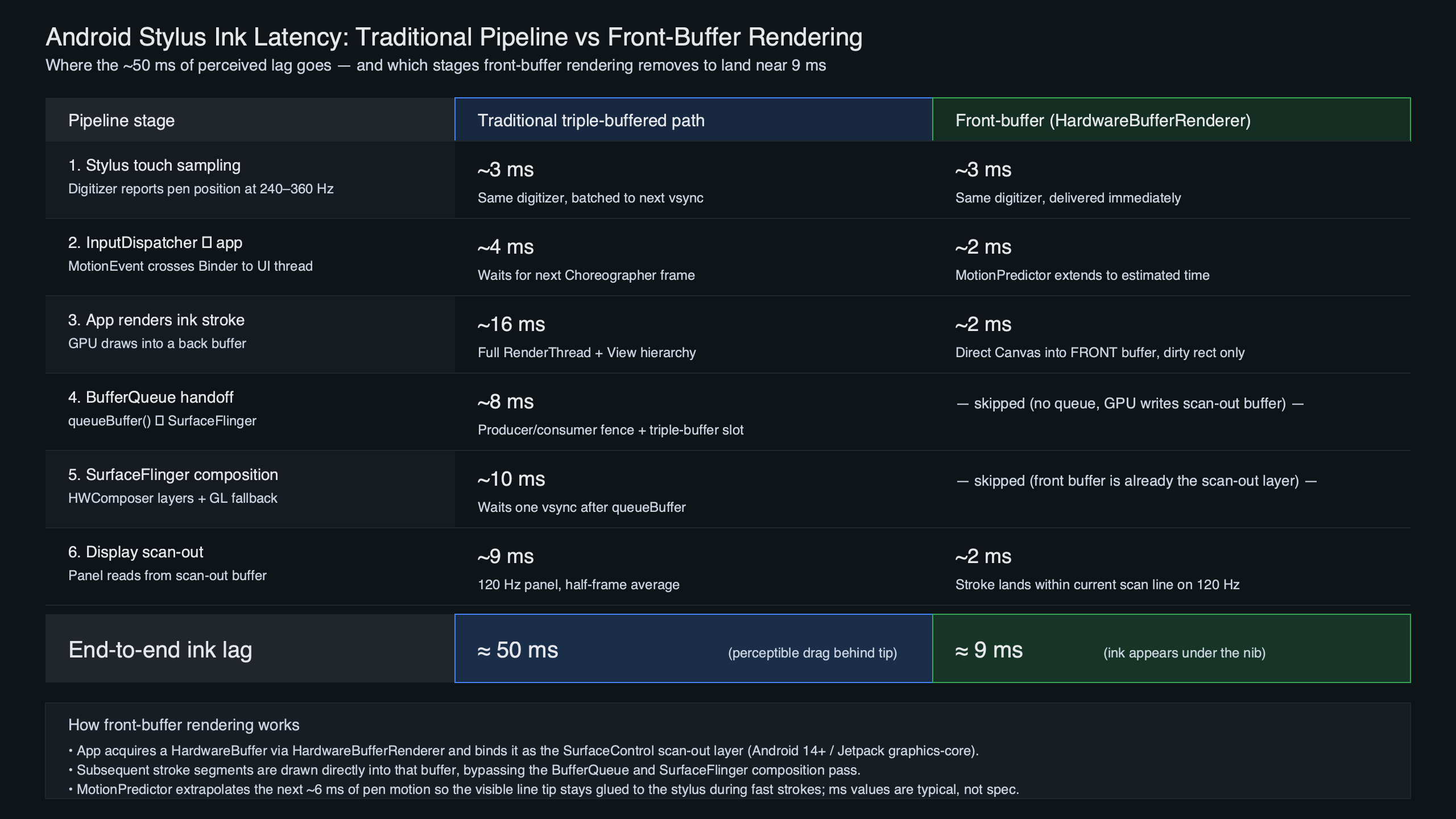
The pipeline diagram above traces a single stylus sample from the digitizer through to a lit pixel. Each box is a stage where time accumulates. The two longest bars are SurfaceFlinger composition, which is gated on vertical sync, and the digitizer sample interval itself. Those are the two places the engineering work has concentrated.
See also sensor pipeline deep dive.
| Stage | Illustrative budget | What sets the floor |
|---|---|---|
| Stylus sensor sample | ~4–10 ms | Digitizer scan rate (commonly 120–240 Hz on phones, with premium tablet hardware reaching into the several-hundred-Hz range) |
| InputReader / InputDispatcher | ~1–3 ms | System-server thread scheduling |
| App MotionEvent handling | ~1–4 ms | Per-event Java/Kotlin work in the UI thread |
| GPU draw of new segment | ~2–4 ms | Stroke complexity and buffer setup |
| SurfaceFlinger composition | ~8–16 ms | Waits for the next vsync tick at 60 Hz |
| Display scanout | ~4–8 ms | Panel timing and pixel row latency |
Sum a plausible combination of those rows on the standard path and you land somewhere in the rough neighborhood of 20–45 ms — the range humans easily perceive as ink “trailing” the pen tip. Research summarized in the “In the blink of an eye” stylus-latency paper shows users can detect lag well into the single-digit millisecond range during direct-touch ink, which is why every millisecond below 16 matters.
Why SurfaceFlinger is the bottleneck — and why front-buffer rendering removes exactly that stage
SurfaceFlinger is the system compositor. Every window — your notebook app, the navigation bar, the status bar, a floating keyboard — produces buffers, and SurfaceFlinger walks the layer list on each vsync tick, picks the latest buffer from each producer, and hands the composited frame to the Hardware Composer. The behavior is documented in detail on the AOSP SurfaceFlinger and WindowManager page. The key constraint is that composition is locked to vsync. You can submit a buffer 1 ms after the last tick, but it will sit in the queue until the next one, ~16.6 ms later at 60 Hz.
Front-buffer rendering side-steps that pass entirely. Rather than handing a new buffer to the compositor, the app writes directly into the buffer the display controller is currently scanning out. The pixels appear as the scanline crosses them — there is no wait for the compositor and no wait for the next vsync. You are racing the display, not the system.
More detail in low-level platform plumbing.
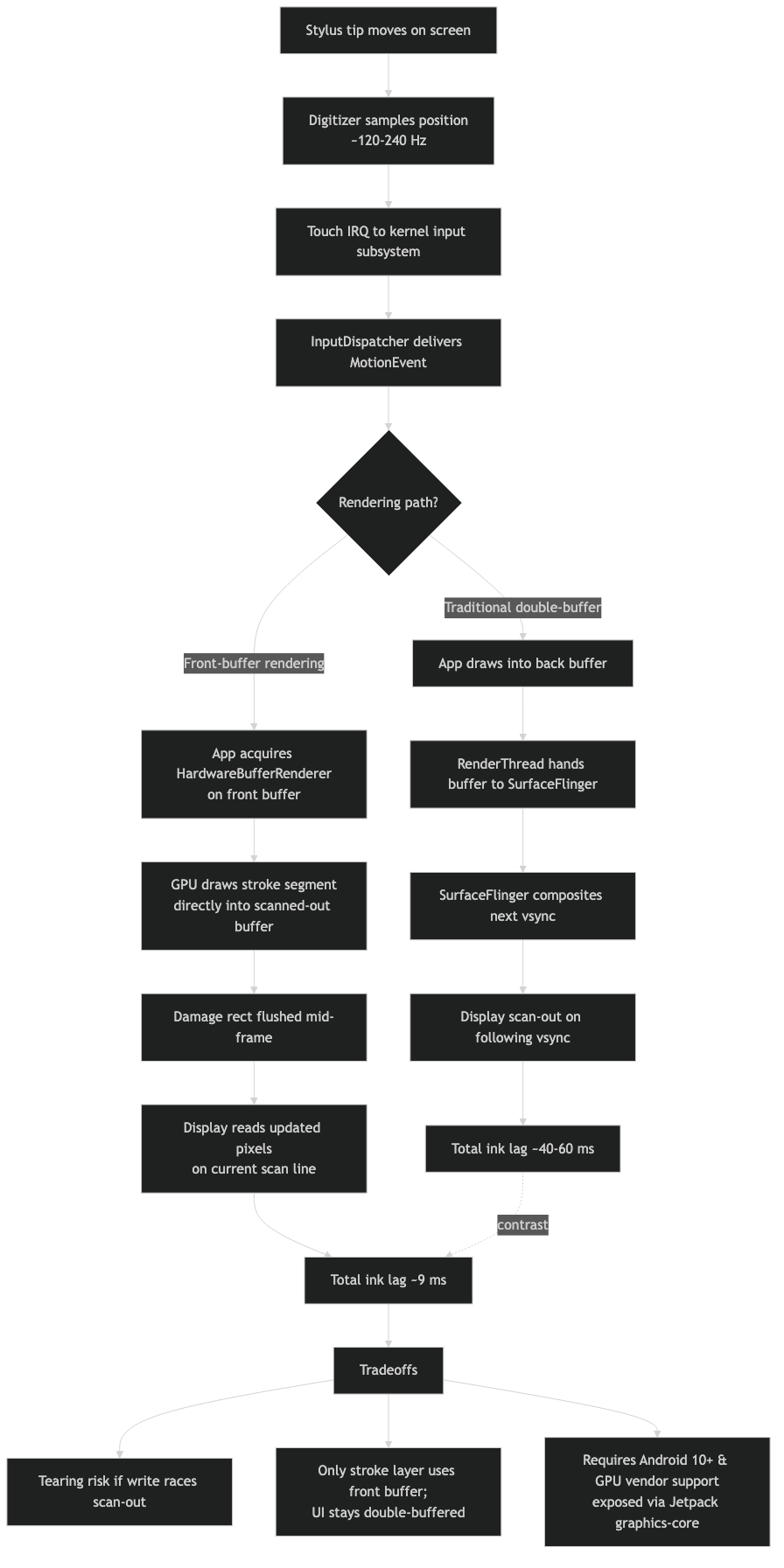
How the pieces connect.
The architecture diagram above contrasts the two paths. On the standard path, the app’s GPU draw lands in a back buffer that is handed to SurfaceFlinger; the compositor combines it with every other layer and submits one frame to the display on the next vsync. On the front-buffer path, the wet-ink layer is its own dedicated buffer, mapped as the front of a buffer chain that the display is already reading. The compositor still owns every other layer in the system; what changes is that the active-stroke layer has been pulled out of the composition pass.
| Stage | Standard path | Front-buffer path |
|---|---|---|
| Stylus sample | Yes | Yes |
| InputReader / Dispatcher | Yes | Yes |
| App MotionEvent handling | Yes | Yes |
| GPU draw to back buffer | Yes | Bypassed during stroke |
| GPU draw to front buffer | No | Yes |
| SurfaceFlinger composition | Yes, gated on vsync | Bypassed during stroke |
| Display scanout | Yes | Yes |
| Commit to back buffer on ACTION_UP | n/a | Yes, replays full stroke |
Two stages disappear from the active-stroke window: the back-buffer write and the compositor pass. That is the entire mechanism. Every other column is identical. The ~16.6 ms vsync wait is the single largest contributor to the lag a user feels on a 60 Hz panel, and it is the one stage front-buffer rendering removes outright.
The AndroidX graphics-core API in practice
AndroidX exposes the front-buffer path through two cousin classes in the graphics-core library. They share a model: an app declares a front-buffered layer for the wet stroke and a multi-buffered layer for everything else, then implements two callbacks that decide what gets drawn where.
GLFrontBufferedRenderer is the OpenGL ES variant. Apps that already render with GLSurfaceView or their own EGL setup use this. The renderer manages two SurfaceControl layers internally and exposes a callback that fires for each incoming stroke segment — the app’s job is to draw only that segment, not the whole stroke, into the front layer. A second callback fires on commit, when the full stroke is replayed into the persistent double-buffered layer.
More detail in larger-canvas Android devices.
CanvasFrontBufferedRenderer is the Canvas variant. It is the same flow but built around android.graphics.Canvas, which is the API the View toolkit uses by default. For apps that already draw notes with a Path and a Canvas, the porting cost is much lower — the draw code stays nearly identical, and only the surface plumbing changes.
The behavioral sequence during a real stroke matters more than the class names. While the pen is down, each batch of MotionEvents triggers a delta render into the front layer; the user sees ink appear under the tip with the active-stroke latency described above. When ACTION_UP arrives, the renderer flushes the complete stroke into the back buffer through the multi-buffered callback and then clears the front layer. The handoff is the trickiest part to get right — if the front layer is cleared before the back layer’s new frame reaches the display, the stroke can flicker.
Example: a typical Android note-taking app that lets the user write or sketch with the stylus draws each pen segment into the front-buffered overlay while the pen is in contact. When the pen lifts, the same path data is replayed onto the persistent Canvas layer behind the overlay, the overlay is cleared, and from that frame on the stroke is composited normally — meaning it now sits inside the document and zooms, scrolls, and undoes like every other line on the page.
Motion prediction is a different problem
Front-buffer rendering removes the compositor wait. It does not remove the digitizer-sample-to-app delay or the scanout time. Those stages add up to several milliseconds even on the best hardware, and a fast-moving pen will visibly outrun them. The mitigation is to predict where the pen is going.
The AndroidX MotionEventPredictor takes the stream of real events and extrapolates the next one from recent samples. The predicted MotionEvent is fed into the same draw path as the real events, so the wet-ink overlay always sits one frame ahead of the physical tip. When the real event finally arrives, the predicted segment is discarded and the actual segment replaces it.
HAL-level regression case study goes into the specifics of this.
The failure mode is recognizable to anyone who has used a low-latency notes app: a small hook or overshoot at the end of a fast stroke, often called rubber-banding. It happens when the pen stops abruptly and the predictor has already extrapolated points beyond the lift. Those points get drawn into the front layer, then erased a frame later when the real event reveals the pen stopped earlier. The artifact is the cost of the speculation.
Front-buffer rendering and motion prediction compose. Prediction draws speculative pixels; front-buffer rendering ensures those pixels reach the screen without sitting in the compositor queue. The combined system is what produces the headline 9 ms figure. The Android Developers Stylus Low Latency writeup by Cedric Ferry walks through both libraries together for exactly this reason — neither one is sufficient on its own, and the engineering case for stacking them is what the article actually defends.
When front-buffer rendering is the wrong tool
The front-buffer path comes with constraints that the API reference glosses over. The first is tearing. Writing into a buffer the display is scanning out means the top of the screen can show the new pixel while the bottom still shows the previous frame. For a single ink-tip update covering a few pixels, this is invisible — the human eye does not catch a one-line tearing event under a moving pen tip. For anything larger, tearing becomes obvious. The path is not a generic latency win; it is specifically a wet-ink win.
The second is alpha blending. The front layer is not run through the compositor’s blend pass against the underlying UI. Whatever is drawn into it composites against the previous contents of that layer, not against the document, ruler, or selection highlight underneath. This is why the AndroidX sample apps draw opaque ink only. Translucent highlighters or semi-transparent brushes need to either fall back to the standard path or stage their blending inside the front-buffered layer itself before commit.
See also productivity-focused slates.
Third: this is for stylus ink and similar tight overlays, not for general UI. Tooltips, popups, scroll content, animated chrome — all of it belongs on the standard double-buffered path where the compositor still handles z-order and clipping correctly.
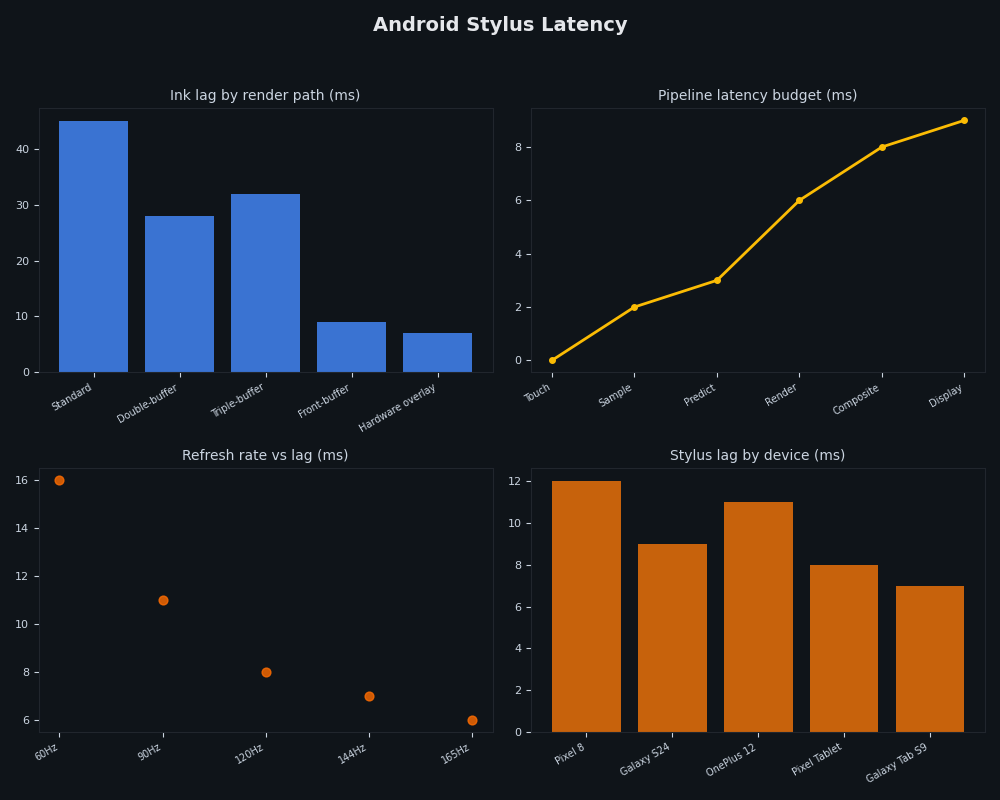
The dashboard view above tracks the practical signal of all of this from the user’s seat: the gap, in milliseconds, between pen motion and visible ink across configurations. Standard double-buffered rendering on a 60 Hz panel sits at the top of the range — somewhere in the rough 30–50 ms band depending on device. Adding front-buffer rendering drops the active-stroke bar into the single-digit-to-mid-teens band, because the ~16.6 ms compositor wait has been removed. Pairing it with motion prediction pulls the perceived bar lower still, because the visible ink is now leading the physical tip rather than trailing it. Treat the bands as relative, not absolute; the point is the ordering, not the exact endpoints.
Fourth: there is a hardware cost. The front-buffered layer is backed by a HardwareBuffer, and very old or memory-constrained devices either do not support the configurations the AndroidX library expects or pay a meaningful resource overhead to host the extra layer. The chromeos/low-latency-stylus sample repository is the cleanest public reference for what a fully working integration looks like, including the back-pressure handling around HardwareBuffer allocation.
What the floor would have to break to go below 9 ms
The 9 ms figure should be read as a representative floor on commodity 60 Hz Android tablet hardware once you have removed the compositor wait and layered prediction on top, not as a theoretical lower bound. Pushing lower means attacking the stages that are still in the pipeline.
Higher digitizer sample rates are the most direct lever. Doubling the pen scan rate roughly halves the sampling interval; very high scan rates of the kind already common on premium drawing tablets in the desktop world would compress the first row of the budget table substantially. Several recent Android tablet stylus stacks have inched in this direction, though the digitizer hardware is the limiting cost.
Related: early beta-channel quirks.
Display refresh rate is the next lever. A 120 Hz panel cuts the scanout window roughly in half and reduces the worst-case wait for a vsync-locked stage on any layer that still goes through the compositor. Any layer that still routes through SurfaceFlinger inherits the new, shorter vsync interval — so even mixed pipelines that combine a front-buffered ink layer with a standard UI benefit from the faster panel.
Predictive scanout — having the display controller itself accept partial frame updates mid-scan — would eat the remaining scanout cost. Variable refresh rate panels that present a frame the moment it is ready, rather than at fixed tick boundaries, accomplish a similar thing for the standard path. Neither is universal on Android tablets today, which is why the achievable floor on most hardware still rounds to single-digit milliseconds rather than going lower.
For consumers picking a device for drawing or handwriting, the practical reading is this: the panel refresh rate, the digitizer scan rate, and whether the app uses AndroidX graphics-core do more for perceived ink lag than any other spec on the box. A 120 Hz tablet running a front-buffer-aware notes app will feel like glass-on-paper. The same hardware running an app that draws ink through the standard View hierarchy will feel like there is a small but noticeable rubber band between the pen and the line. The 9 ms figure is not a property of the hardware — it is a property of the rendering path the app decided to use.
References
- AndroidX graphics-core release notes (developer.android.com) — the canonical reference for GLFrontBufferedRenderer, CanvasFrontBufferedRenderer, and the supported buffer configurations.
- SurfaceFlinger and WindowManager (AOSP) — the system-level documentation for how composition, vsync, and the Hardware Composer interact.
- Android graphics architecture (AOSP) — covers the BufferQueue model, scanout, and producer-consumer flow that the front-buffer path bypasses.
- MotionEventPredictor API reference (developer.android.com) — the AndroidX input motion-prediction class and its expected event-replacement semantics.
- Stylus Low Latency by Cedric Ferry (Android Developers, Medium) — the original engineering walkthrough that pairs front-buffer rendering with motion prediction and explains why neither library is sufficient on its own.
- chromeos/low-latency-stylus sample (GitHub) — a working reference implementation including front-buffer setup, prediction wiring, and the commit-on-ACTION_UP handoff.