Ditching ABRP: Google Maps EV Routing Actually Works Now
I was sitting at a broken Electrify America station in 15-degree weather two winters ago, furiously toggling between three different apps just to figure out if I could make it home. My car’s native navigation said yes. A Better Routeplanner (ABRP) said no. My mental math, which is notoriously bad when I’m freezing, said maybe.
If you drive an EV, you know this exact panic. We’ve spent years dealing with fragmented software. Your phone has the best maps, but your car has the battery data. Getting them to talk to each other usually required buying a Bluetooth OBD-II dongle, tearing apart your dashboard, and praying a third-party app wouldn’t crash mid-drive.
Google finally fixed it. Mostly.
They recently pushed a massive update to Android Auto that integrates live battery predictions and charging stops for over 350 specific EV models. No dongles. No weird developer API keys. You plug in your phone, and Google Maps just reads your state of charge (SOC) directly from the car’s infotainment system.
The Highway Test
I didn’t trust it at first. I’ve been burned by too many software updates promising to fix range anxiety.
I run Android Auto v13.2 on a Galaxy S24 Ultra, connected to a 2024 Hyundai Ioniq 5. Last Thursday, I drove from Chicago down to Indianapolis. I purposely skipped my usual top-off charge before hitting I-65 just to see how the new routing algorithm would handle a forced stop.
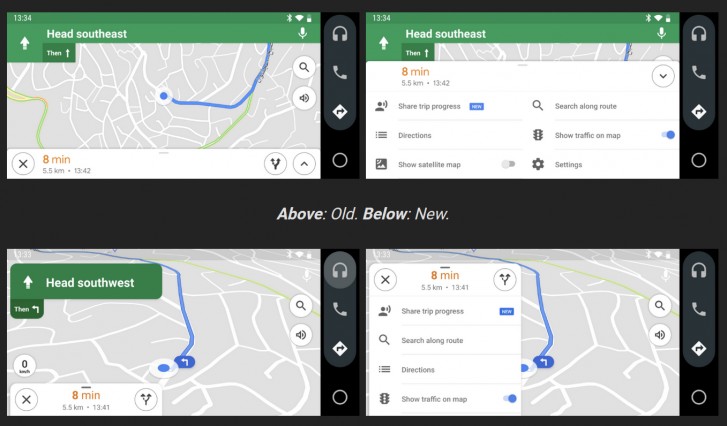
The interface is surprisingly quiet about what it’s doing. You type in your destination. Maps spins for about two seconds, then spits out a route with a little yellow lightning bolt icon. It told me I’d hit the Lebanon charging station at 18% battery, charge for 14 minutes, and arrive in Indy with 20%.
I pulled into Lebanon at 17%. A one percent variance over a 160-mile stretch with heavy crosswinds. That is insanely accurate.
For comparison, my baseline test using ABRP version 5.1 usually misses by 3-4% unless I manually tweak the headwind and extra weight sliders. Google seems to be bypassing the manual inputs by just quietly analyzing your real-time consumption rate (mi/kWh) over the last few miles and adjusting the arrival estimate dynamically.
Where the Logic Fails
It’s not all magic, though. I ran into a pretty glaring edge case that you need to watch out for if you live somewhere cold.
Battery pre-conditioning is the Achilles heel of phone-based projection. When you use your car’s built-in navigation to route to a DC fast charger, the car knows it needs to heat up the battery pack. A warm battery can pull 230kW. A cold battery might max out at 60kW, turning a 15-minute stop into an hour-long hostage situation.
Does Google Maps via Android Auto trigger the car’s pre-conditioning sequence? It’s a coin toss.
During my testing, the API handshake for thermal management completely failed on the Ioniq 5. Maps knew I was going to a charger. The car’s screen showed the route. But the battery heater never kicked on. I had to manually activate the heater in the car’s sub-menus about 30 miles out. I asked a friend with a Mach-E to test the same thing, and his car did trigger the pre-conditioning automatically.
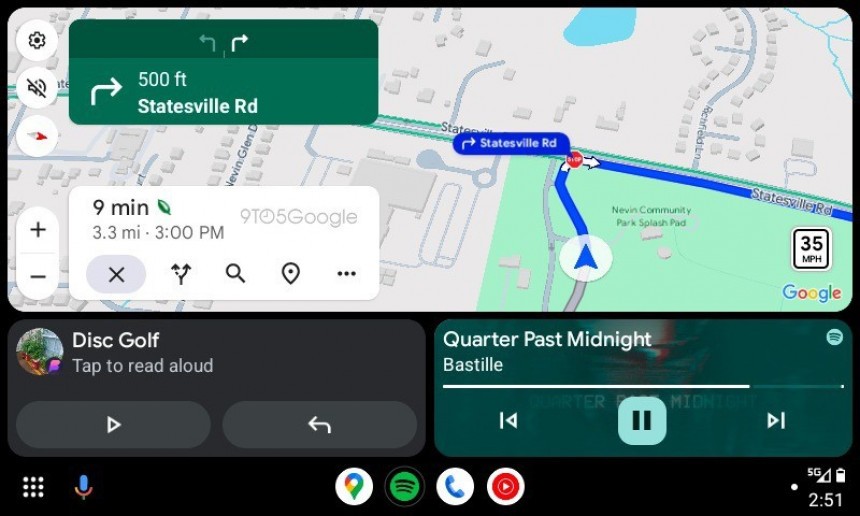
This tells me the software bridge between the phone and the vehicle’s Battery Management System is still highly dependent on how the automaker wrote their specific API. Don’t blindly trust it in winter yet. Watch your dash to see if the heating icon illuminates.
The Charger Filtering Problem
There’s another weird quirk in how Google prioritizes stops.
The algorithm heavily favors minimizing total trip time. Mathematically, this makes sense. Practically, it’s incredibly annoying. On a trip to Milwaukee, Maps kept trying to route me to a single 150kW charger sitting alone in the back of a dark dealership lot at 10 PM, simply because it saved me four minutes compared to a massive, well-lit 8-stall charging hub two exits down.
You can tap the charging stop and swap it out for an alternative, but the filtering options are painfully basic right now. You can filter by plug type (CCS vs NACS) and charging speed. You still can’t filter by specific networks. If I have a monthly pass for EVgo, I want to prioritize EVgo. Maps doesn’t care. It just wants you off the highway and back on as fast as computationally possible.
Actually Usable
Despite the pre-conditioning mess and the stubborn routing logic, I haven’t opened ABRP in two weeks. I cancelled my premium subscription yesterday.
Having your actual SOC displayed right on the map screen, updating in real-time without third-party hardware, is exactly what phone projection was supposed to be in the first place. When I accelerate hard up a ramp, I watch the arrival estimate drop by a percent. When I get stuck behind a truck doing 55 mph, I watch it tick back up. It removes the mental load of driving an EV on long trips.
Just remember to manually warm up your battery before you plug in.
Frequently asked questions
How accurate is Google Maps EV routing compared to ABRP?
In a 160-mile Chicago-to-Indianapolis test on a 2024 Hyundai Ioniq 5, Google Maps predicted arrival at the Lebanon charger at 18% battery; the car pulled in at 17%, a one percent variance even with heavy crosswinds. ABRP version 5.1 typically misses by 3-4% unless headwind and weight sliders are manually tweaked. Google adjusts dynamically by analyzing real-time mi/kWh consumption.
Does Android Auto trigger EV battery pre-conditioning before fast charging?
It is inconsistent and depends on the automaker’s API implementation. During testing on a 2024 Ioniq 5, Google Maps knew the route targeted a DC fast charger but the battery heater never engaged, forcing manual activation 30 miles out. A Mach-E owner reported pre-conditioning triggered automatically. In winter, watch the dashboard heating icon and warm the pack manually if needed.
Which EV models support native Google Maps battery integration on Android Auto?
Google recently pushed an Android Auto update supporting live battery predictions and charging stops for over 350 specific EV models. Integration works without a Bluetooth OBD-II dongle or developer API keys; plugging the phone in lets Google Maps read state of charge directly from the car’s infotainment system. Testing was performed on Android Auto v13.2 with a Galaxy S24 Ultra and Ioniq 5.
Can you filter Google Maps EV charging stops by network like EVgo?
No network-specific filtering exists yet. Current filters cover only plug type (CCS versus NACS) and charging speed. The algorithm prioritizes minimizing total trip time, which sometimes routes drivers to isolated single chargers over larger well-lit hubs that cost a few extra minutes. You can tap a suggested stop to swap it manually, but EVgo, Electrify America, and other network preferences cannot be prioritized automatically.